A data-driven breakdown of how Pipedrive’s newest inbox update restores lost revenue, strengthens pipeline health, and gives sales teams a competitive edge over HubSpot.
Introduction: Why Deals Die Without Email Follow-Ups (and How to Find Unanswered Emails)
Most deals don’t die because a competitor outperformed you. They don’t die because your price was too high. They don’t die because the customer changed their mind.
Most deals die because nobody followed up.
Not intentionally — but quietly: lost in a crowded inbox, buried under daily tasks, forgotten during a busy week.
Many sales reps stop following up too early, while buyers often need multiple touchpoints before making a decision. Not because reps are careless — but because inboxes don’t make unanswered conversations visible.
This is exactly what Pipedrive’s new Follow-Up Filter fixes: it helps you track unanswered emails, surface “no reply” conversations inside your Sales Inbox, and follow up before revenue goes cold.
The Follow-Up Filter fixes a silent inbox problem, but it wasn’t the only major change Pipedrive shipped in 2025. That same year also brought a significant upgrade to Products, subscriptions, line items, and revenue forecasting — we covered that update here: Pipedrive’s 2025 Products & subscriptions update.
[CTA title="Want this set up in your Pipedrive?" body="If you’d like a done-for-you configuration of follow-up filters, inbox views and automations, our team can audit your current Pipedrive setup and build a follow-up system that fits your sales process." btn_text="Book a Pipedrive follow-up audit" btn_link="https://metaworkstudio.pipedrive.com/scheduler/3Exoa5s0/free-evaluation" gradient="true"]
The update doesn’t add “another feature.” It gives sales reps what they didn’t have before:
A clear system that identifies every unanswered email, across every deal, automatically.
This article explains how it works, why it matters, how much revenue it protects, and what makes it fundamentally better than HubSpot’s outdated inbox structure.
2. What the Follow-Up Filter Does — and Why It Matters
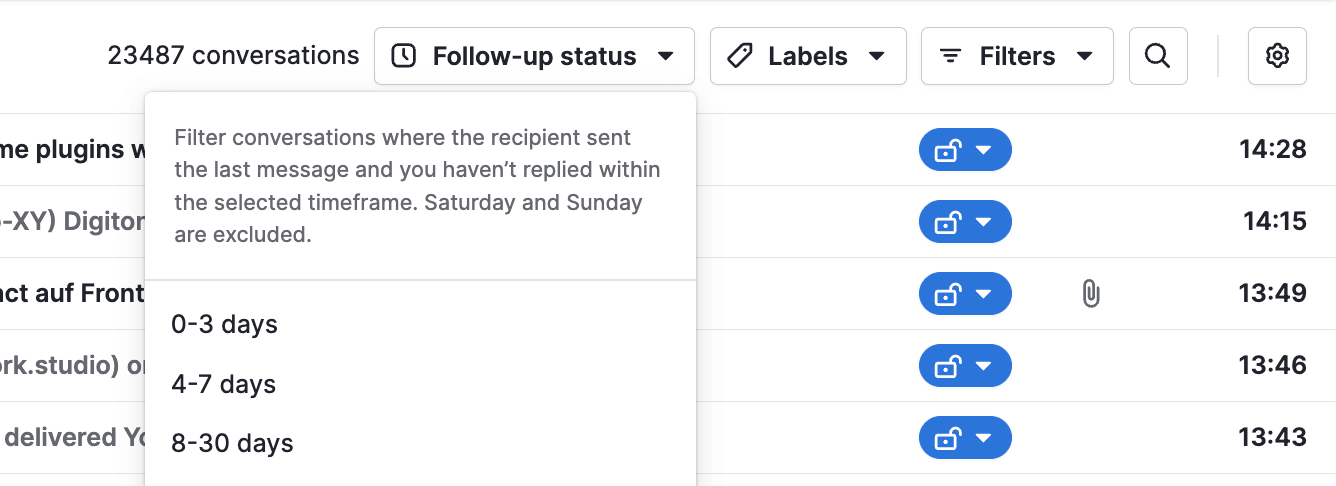
The Follow-Up Filter allows sales reps to instantly identify all emails that have not received a response within a defined timeframe.
You can filter by:
- No response in 0–3 days
- No response in 4–7 days
- No response in 8–30 days
This is not cosmetic. It restructures the way sales teams manage communication.

Key outcomes
- No more forgotten leads – every unanswered email becomes visible.
- Shorter follow-up cycles – sales teams respond faster and reduce deal stagnation.
- Higher deal recovery rates – silent leads often convert when re-engaged.
- Cleaner weekly workflow – reps know exactly where attention is required.
- Protection against human error – even top performers miss things. The filter doesn’t.
3. Why This Feature Is Transformational for Sales Teams
3.1. It attacks the biggest performance bottleneck
In practice, sales teams consistently run into the same performance bottleneck:
- Deals frequently stall due to slow or inconsistent follow-ups.
- Sales reps tend to underestimate how many conversations go unanswered.
- Managers often become aware of missed communication only after deals have already gone cold.
The Follow-Up Filter removes this bottleneck by replacing guesswork with clear, real-time visibility into unanswered emails.
3.2. It replaces manual inbox management
Before this update, reps often:
- Tagged emails manually
- Created reminders
- Relied on memory
- Used spreadsheets
- Bookmarked conversations
- Scrolled endlessly to “find that one email”
Now the system does it for them — removing manual tracking and freeing up time that can be spent on actual selling instead of inbox maintenance.
When you combine inbox discipline with faster outreach channels — for example, how to make calls from your mobile phone in Pipedrive — you can respond the moment a deal goes quiet, not a week later.
3.3. It improves forecasting accuracy
The filter reveals:
- Which deals are truly active — not just sitting in the pipeline
- Where email conversations have paused
- When follow-ups are overdue
- Which deals are at risk due to silence
This gives sales managers clearer pipeline signals without micromanaging individual reps.
3.4. It supports higher win rates
Teams that adopt structured follow-up workflows consistently report better deal momentum and stronger close rates across their sales inbox.
The Follow-Up Filter provides the visibility required to build those workflows — ensuring that promising deals don’t stall simply because an email was missed.
4. The Real Power: Combining Follow-Up Filters With Sales Inbox Email Filters
You can layer follow-up filters with any other inbox filters, creating precise, revenue-driven views that sales reps rely on daily.
Combination 1: High-value deals with no response in 8–30 days
Filters:
- Deal value: High
- No reply: 8–30 days
- Stage: Proposal sent
Purpose: Recover revenue before it goes cold.
Impact: Helps recover high-value deals before they go cold.
Combination 2: Warm leads that went silent
Filters:
- Lead status: Warm
- Emails opened: Yes
- No reply: 8–30 days
- From: Contact

Purpose: Revive near-ready prospects.
Impact: Increases conversion rate for warm leads.
Combination 3: Negotiation stage with delayed replies
Filters:
- Pipeline: Sales
- Stage: Negotiation
- No reply: Custom range
Purpose: Maintain deal momentum.
Impact: Reduces drop-offs in the most critical stage.
[CTA title="Late-stage deals going quiet?" btn_text="We can help you fix that in Pipedrive" btn_link="https://metaworkstudio.pipedrive.com/scheduler/3Exoa5s0/free-evaluation" gradient="true"]
Combination 4: Paid campaign leads with no response
Filters:
- Source: Google Ads / LinkedIn Ads
- No response: 14 days
Purpose: Improve ROI on paid channels.
Impact: Ensures marketing spend doesn’t go to waste.
Combination 5: Personal emails without responses
Filters:
- Email type: Manual
- No response: 21 days
Purpose: Strengthen relationship-driven sales.
Impact: Ensures high-touch outreach remains consistent.
5. HubSpot vs Pipedrive Sales Inbox: Personal Inbox, Follow-Up Tracking, and “No Reply” Visibility
HubSpot is a respected CRM. But in 2025, it still has a major limitation:
HubSpot has no personal inbox for sales reps.
This creates multiple performance issues:
- No individual follow-up tracking
- No silence detection
- No personal filtering
- No way to audit personal communication gaps
- Difficulty for reps who rely on 1:1 conversations
If you want the full picture beyond inbox features, see our detailed Pipedrive vs HubSpot comparison covering workflows, pricing, and real-world sales execution.
Now compare that with Pipedrive:
Pipedrive Sales Inbox (2025)
HubSpot’s inbox is optimized for teams and marketing workflows — not for individual sales performance.
Pipedrive’s inbox is built for sales reps who communicate one-on-one, manage volume, and close deals.
[CTA title="If HubSpot’s inbox feels limiting, you’re not imagining it." body="Pipedrive gives reps real follow-up visibility — and we can set it up properly for your team." btn_text="See how we’d configure it for your sales process" btn_link="https://metaworkstudio.pipedrive.com/scheduler/3Exoa5s0/free-evaluation" gradient="true"]
6. How the Follow-Up Filter Strengthens Sales Performance
The Follow-Up Filter leads to measurable improvements in performance:
Shorter sales cycles
Consistent follow-ups significantly increase the likelihood of a response.
Higher contact rates
Prospects who receive consistent follow-ups are more than twice as likely to respond.
Increased accountability
Reps can’t hide missed communication. Managers instantly see follow-up gaps — without micromanaging.
Better pipeline hygiene
The filter surfaces:
- Aging conversations
- Stalled deals
- Inactive buyers
- Opportunities requiring a nudge
Everything becomes visible.
More accurate forecasting
Silent deals distort forecasts. This feature helps reduce that uncertainty.
7. Real Scenarios Where the Follow-Up Filter Saves Deals
Scenario 1: The executive who forgot to reply
A CEO shows interest, asks for a proposal, then goes quiet for two weeks. The Follow-Up Filter flags the unanswered thread, prompting a timely follow-up that often brings the conversation back to life.
Scenario 2: The overloaded sales rep
150 conversations, 30 deals in play, 3 active pipelines. Without filters — total chaos. With filters — clarity in seconds.
Scenario 3: The sales manager monitoring quality
Instead of guessing or relying on lagging reports, managers can see unanswered emails by rep, timeframe, or pipeline — and address gaps before deals are lost.
Scenario 4: The SDR-to-AE handoff
Before assuming a lead has gone cold, account executives can quickly review unanswered threads and pick up the conversation with full context.
Scenario 5: The consultant managing multiple client accounts
For consultants managing multiple client accounts, follow-up filters help separate urgent conversations from background noise — keeping each inbox manageable.
Across roles and sales motions, the pattern is the same: deals don’t stall because of intent — they stall because unanswered conversations go unnoticed. The Follow-Up Filter makes those gaps visible before revenue is lost.
8. Expert Tips to Get Maximum Value From the Follow-Up Filter
Tip 1: Daily “7-day silence” sweep
Every morning, review conversations with no response in the past 0–7 days to maintain consistent follow-up discipline.
Tip 2: Weekly “30-day revival” review
Reach out to prospects who went silent in the past 30 days to re-open conversations that may still be relevant.
Tip 3: Prioritise high-value deals
Sort by deal value combined with no-response status to focus attention where it matters most.
Tip 4: Use templates for silent leads
Prepare short templates for common follow-up situations:
- “Did you get my proposal?”
- “Any thoughts on next steps?”
- “Still interested in moving forward?”
Tip 5: Schedule follow-ups immediately after sending emails
Combine manual follow-up habits with automated filters to reduce the risk of missed conversations.
9. Conclusion: A Sales Inbox System That Prevents Unanswered Emails From Killing Deals
The Follow-Up Filter is more than a convenience feature. It changes how sales teams manage email communication by making unanswered conversations visible, structured, and easier to act on.
With the right setup, teams can:
- Recover deals that would otherwise stall
- Maintain momentum across active conversations
- Reduce the risk of silent drop-offs
- Prioritise follow-ups more effectively
- Spend less time managing inboxes manually
Silent leads are no longer hidden inside individual inboxes. Every unanswered email becomes a clear signal that can be reviewed, prioritised, and addressed.
And as of 2025, while HubSpot still relies on shared or team inbox structures, Pipedrive remains one of the few CRMs built around personal sales communication and follow-up discipline.
Sales performance should not depend on memory alone. With the right inbox system in place, it doesn’t have to.
[CTA title="Your pipeline is leaking. Want us to plug it?" body="If you’re losing deals to NO REPLY, we can set up Pipedrive so every silent conversation becomes a visible task — with filters, views, and automations tailored to your sales process." btn_text="Book a Pipedrive follow-up audit" btn_link="https://metaworkstudio.pipedrive.com/scheduler/3Exoa5s0/free-evaluation" gradient="true"]
No fluff. You’ll see exactly where deals go silent and how to fix it.
FAQ: Pipedrive Follow-Up Filter, Unanswered Emails, and Sales Inbox Workflows
What is the Follow-Up Filter in Pipedrive?
The Follow-Up Filter is a feature in Pipedrive’s Sales Inbox that highlights conversations where the recipient sent the last message and you haven’t replied within a specific timeframe. It helps sales reps quickly find no-reply emails and prevent deals from going cold.
How does Pipedrive track unanswered emails?
Pipedrive tracks which side sent the last message in each email thread. The Follow-Up Filter surfaces conversations where the contact wrote last and you haven’t responded in 0–3, 4–7, or 8–30 days, excluding weekends. This gives you a clear list of follow-ups to handle.
Can I combine the Follow-Up Filter with other filters in Pipedrive?
Yes. You can combine the Follow-Up Filter with other filters such as deal value, pipeline stage, email type, lead status, or message source. For example, you can create a view of high-value deals with no reply in the last 8–30 days, or warm leads who opened your email but never answered.
Does HubSpot have a similar personal inbox feature?
As of 2025, HubSpot offers shared and team inbox options but does not provide the same type of personal inbox and follow-up filtering for individual sales reps that Pipedrive does. Pipedrive’s Sales Inbox is built specifically around 1:1 sales communication and follow-up discipline.
How often should my team review no-reply conversations?
A good rhythm is to review 0–3 and 4–7 day no-reply conversations daily, and run an 8–30 day “revival” review weekly. This helps maintain momentum on active deals while still recovering older opportunities that went quiet.
Can the Follow-Up Filter be automated in Pipedrive?
The Follow-Up Filter highlights unanswered emails, but its real value appears when combined with inbox views, activities, and automations. With the right setup, silent conversations can automatically trigger follow-up tasks, reminders, or workflows tailored to your sales process.
Quick win
Open your Sales Inbox, activate the Follow-Up Filter, and uncover deals you didn’t know you were losing. Most teams find revenue waiting in the first 5 minutes.