 Metabrain
 MetaPipe
 MetaHub

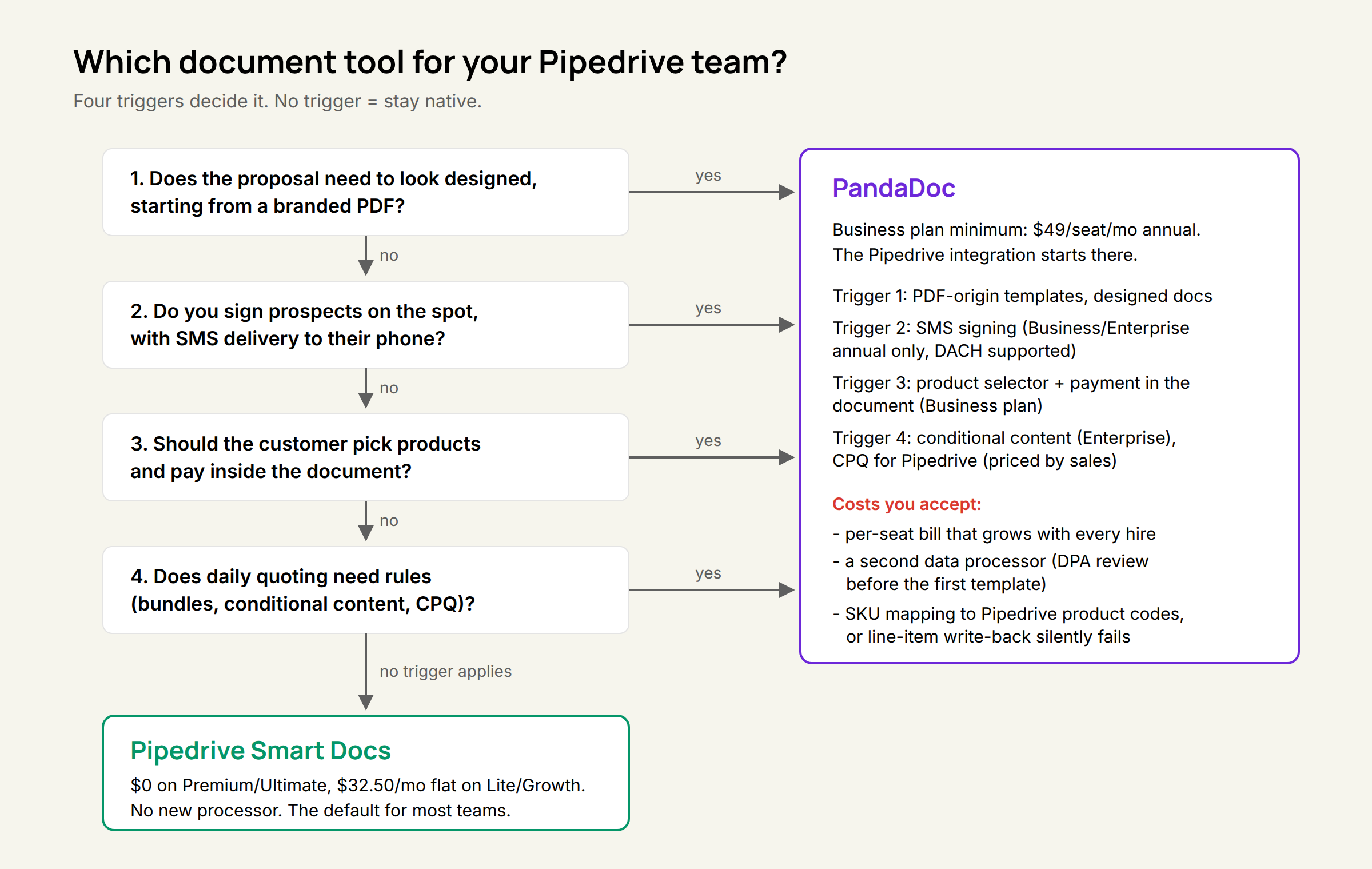
TL;DR: Smart Docs is good enough for the vast majority of cases at no extra cost. PandaDoc is great when:
- signing via SMS is required
- the customer should pick products inside the document and pay right away
- a big catalog and complex pricing logic are part of the daily quoting process
- your documents have to look designed and already exist as PDFs
The trade is always the same: better documents against a second per-seat subscription and a second data processor in your GDPR documentation. And PandaDoc’s cost isn’t negligible either: $49 per seat blows up fast when the sales team is big.
There are some convenience benefits on top. Field mapping is powerful. Workflows are great. SMS signing is the trigger that changed this year, so all facts below are re-verified as of September 2026.
What you are comparing
A built-in module against a separate product. Smart Docs lives inside Pipedrive: your existing login, your existing permissions, templates that fill themselves from deal, contact and product data. With several quirky limitations:
- to this day, address fields other than the organization’s aren’t available as subfields (street, zip code, city). It’s a huge bummer and very inconvenient
- adding signature spots and text fields is required every single time, on every document you send. You can’t just add them once in the template.
The above two alone can drive teams mad. If both are not an issue, Smart Docs does great.
PandaDoc is its own platform with its own user accounts and billing, connected to Pipedrive through an integration - and that integration requires PandaDoc’s Business plan. Which sets an entry price.
Pricing: the per-seat trap
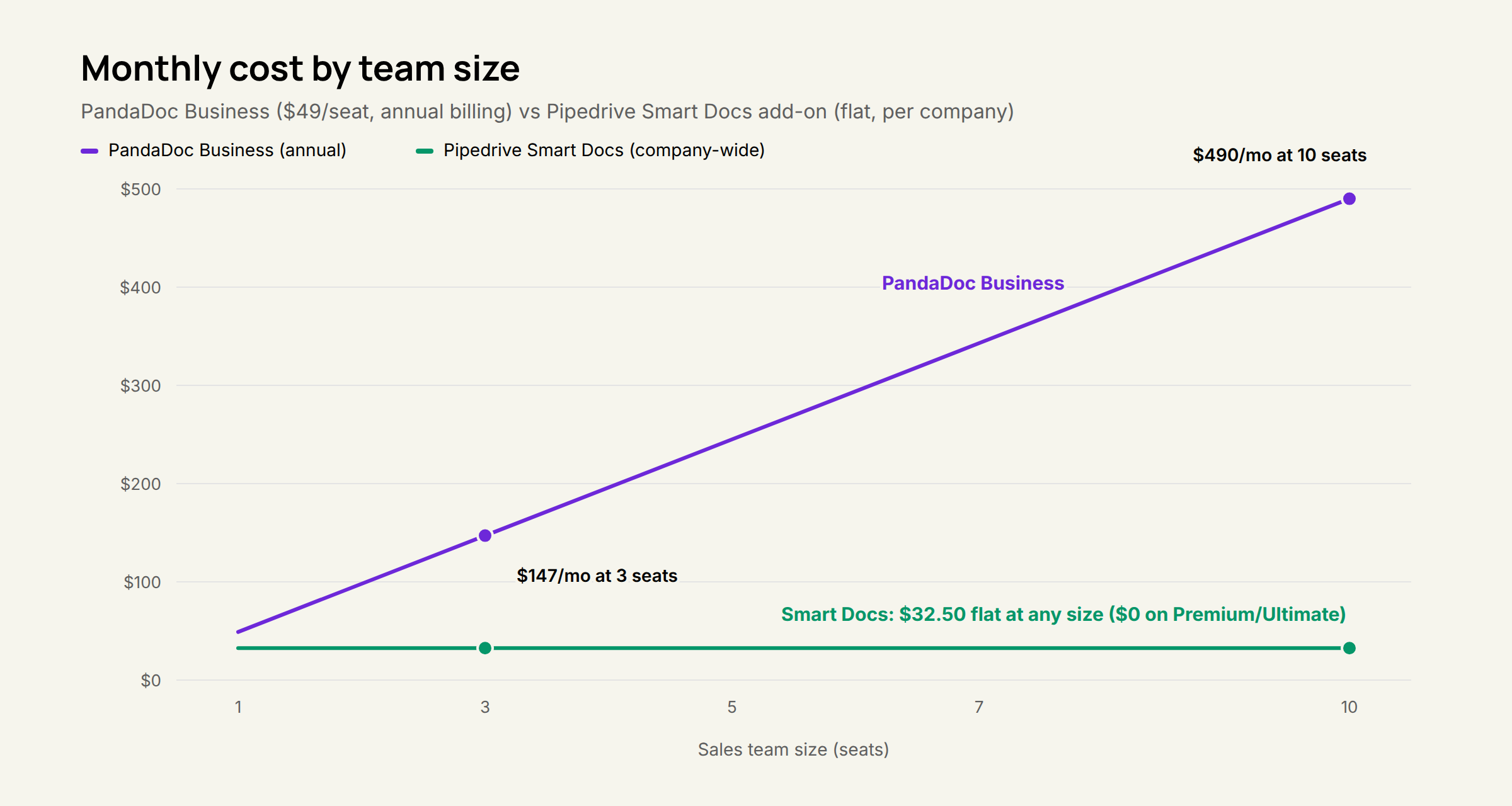
For a Pipedrive team, PandaDoc effectively starts at $49 per user per month, not the $19 on the pricing page. The $19 Starter tier has no CRM integrations - the Pipedrive connection begins at Business, $49 per seat billed annually.
Smart Docs is the opposite shape: included at no extra cost on Premium and Ultimate, and a flat $32.50 per month for the whole company as an add-on on Lite and Growth.
That’s not a subtle difference. Three reps on PandaDoc Business: $147 a month. Ten reps: $490 a month. The same ten reps on Smart Docs: $32.50, or nothing at all if you are on Premium. The per-seat structure is the multiplier - PandaDoc gets more expensive every time you hire, Smart Docs does not.
Templates: PandaDoc is not close, it is ahead by a class
If the document has to look designed, PandaDoc wins and Smart Docs does not even compete. PandaDoc ingests your existing branded PDFs and wraps them in a fillable, trackable layer. In practice that means the quote your designer built in InDesign becomes a template in an afternoon, with variables, pricing table and signature blocks on top.
Smart Docs can’t do anything useful with a PDF. You can upload one, but you can’t edit it and you can’t save it as a template. So building the same look in Smart Docs is not an afternoon - it’s a huge pain in the ass. Its templates are fine for clean, functional quotes and order confirmations. They pull Pipedrive data automatically and that part works well, but “fine” is the ceiling.
For architecture firms, agencies and anyone selling six-figure projects, the proposal is part of the product. Paying per seat for that is defensible.
Signing: in person works on both, SMS works in DACH on PandaDoc
If signing on the spot is important in your business, this one is big. PandaDoc’s SMS document delivery covers Germany, Austria and Switzerland. Earlier in 2026 PandaDoc’s own documentation scoped SMS to the US and Canada; the current help center lists 150+ supported countries including the whole DACH region, at no additional PandaDoc fee. Outside North America the text arrives from an alphanumeric “PandaDoc” sender.
The gate is the plan, not the geography: SMS sending requires Business or Enterprise billed annually. Monthly Business subscribers do not get it. If your sales motion includes “sign it right now, while we are on the phone” - car dealers, brokers, field sales - this single feature can justify the annual commitment. Because a text lands on the phone the prospect is already holding.
For in-person signing neither tool blocks you: both handle the tablet-across-the-table routine through a signing link. eSignatures come with Smart Docs wherever you have it: included on Premium and Ultimate, part of the add-on on Lite and Growth.
Products, buy links and quoting logic
This is where the two tools stop being comparable.
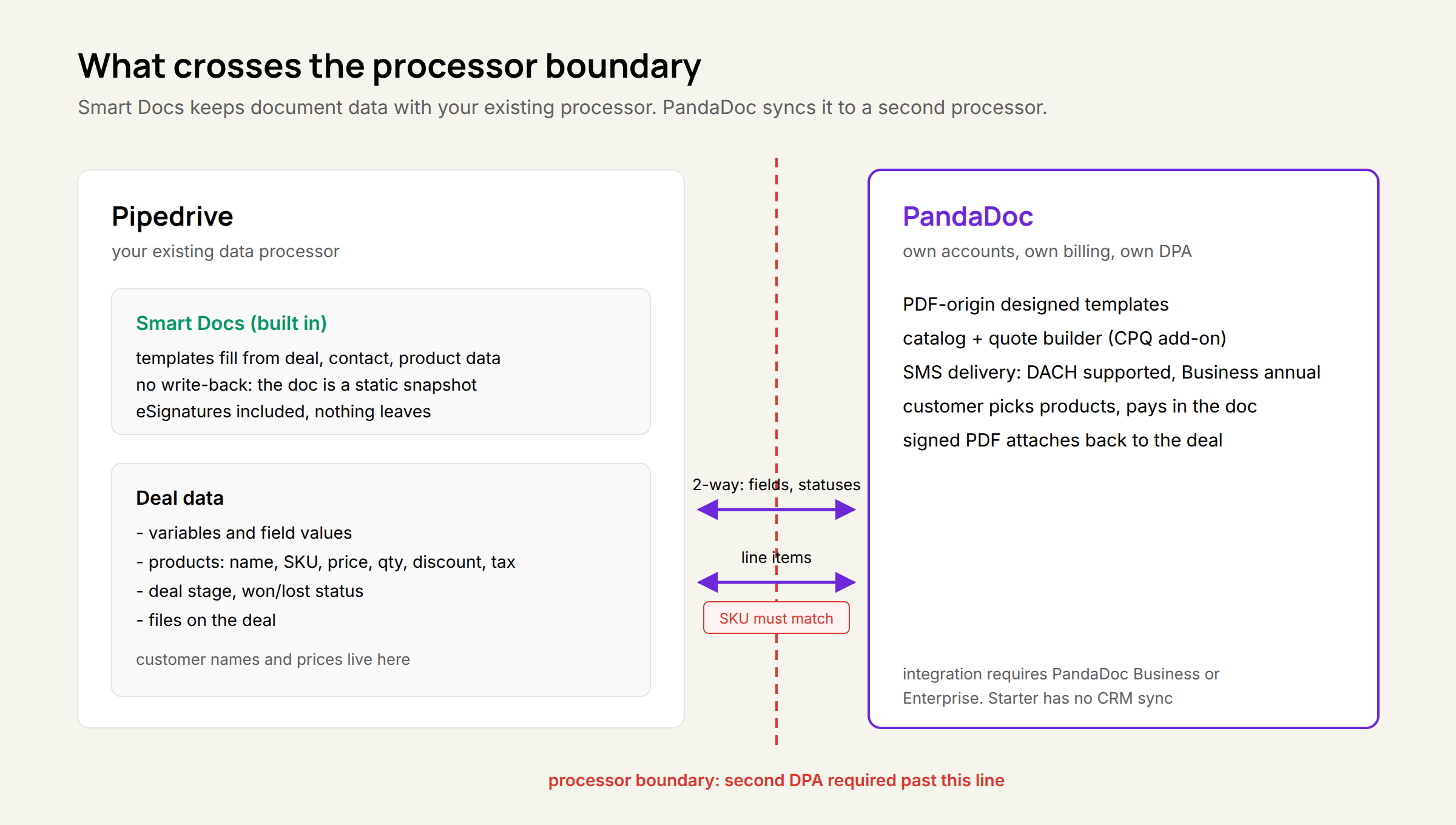
Smart Docs pulls Pipedrive products natively into the document and writes nothing back into the deal. Ever. Change a price or a quantity in the doc and the deal still shows the old numbers. The document is a static printout of the deal at the moment you generated it, and the customer can’t change anything in it either.
PandaDoc turns the quote into something the customer works with:
- Product selector. Items in the pricing table can be optional, set up as single or multiple choice (“pick one of these three packages”), and quantities can be made editable. The customer ticks what they want, the total updates live. Business plan and up.
- Buy link. Payment collection is a workflow step in the template, due by default upon signing. The customer picks, signs and pays in one flow - via Stripe, PayPal, Square, QuickBooks Payments or Authorize.net. Business plan and up (Starter gets a Stripe-only version, rolling out gradually). For productized offers - packages, retainers, onboarding fees - this closes the gap between “yes” and money in the account.
- Richer sync. Two-way on variables, field values, line items and document statuses; the signed PDF is attached back to the deal’s files automatically; rules can move the deal stage or mark it won once the document is completed. What the customer selected ends up on the deal.
Achtung: products added from the PandaDoc catalog only sync back if their SKU matches the Pipedrive product code. Skip product mapping and the write-back quietly does nothing. We have seen this in the wild. It’s the first thing to check when someone says the integration “doesn’t work”.
Logic is the Enterprise layer. Conditional content inserts content library items based on variable values or pricing table data - pick the “Premium support” line item and the matching SLA section appears in the contract by itself. Above that sits PandaDoc CPQ for Pipedrive, launched June 2025: a quote builder inside the Pipedrive deal view with a rules engine for pricing, bundling and disclaimers. If your catalog has variants, bundles and conditional pricing, and your reps quote them every day, this is the capability neither Smart Docs nor plain PandaDoc templates cover. CPQ is priced by sales conversation - so treat it as a project decision, not a checkbox upgrade.
The DPA question (for the GDPR-aware DACH crowd)
For a DACH buyer this is often the deciding criterion, and it has nothing to do with features. Smart Docs adds no new vendor: the document data stays with the processor you already have a data processing agreement (DPA) with. PandaDoc is a second product relationship - its own user model, its own billing, its own DPA. Every document, price and customer name in your proposals flows through it.
For a law firm, a tax advisor or anyone whose clients ask hard questions about data processing, “no new processor” is a feature Smart Docs wins by existing. If you do go PandaDoc, put the DPA review on the project plan before the first template, not after.
Side by side
| Criterion | Pipedrive Smart Docs | PandaDoc (Business, annual) |
|---|---|---|
| Price, 3 reps | $32.50/mo flat, $0 on Premium/Ultimate | $147/mo |
| Price, 10 reps | $32.50/mo flat, $0 on Premium/Ultimate | $490/mo |
| Pipedrive connection | Built in | Integration, Business plan minimum |
| PDF template import | No (upload only, not editable) | Yes |
| Designed-document quality | Basic | Strong |
| eSignatures | Yes, always included | Yes |
| SMS signing in DACH | No | Yes, Business/Enterprise annual only (as of Sep 2026) |
| Customer picks products/quantities | No | Yes |
| Payment collection in the document | No | Yes (Stripe, PayPal, Square and more) |
| Line-item write-back to the deal | None | 2-way, SKU must match product code |
| Conditional content | No | Enterprise |
| CPQ | No | Paid add-on, priced by sales |
| Signed PDF on the deal | Yes | Yes, auto-attached |
| New data processor (DPA) | No | Yes |
Verdict
Use Pipedrive Smart Docs first. See if it works. Upgrade to PandaDoc only if the requirements are not met, because it will get pricey quickly. And if you sell in DACH, count the DPA review as part of the switching cost, not just the seats: Smart Docs adds no processor, PandaDoc adds one.
There’s also an AI alternative to both. In our MetaPipe setups the proposal starts from an AI agent that already knows the product catalog, the pricing rules and the brand voice: it drafts the quote on demand, applies the right branding, writes it back to the Pipedrive deal with a full audit trail, and the rep only reviews before sending. The document tool becomes the last mile instead of the workbench. That pattern works with Smart Docs and PandaDoc alike - it just removes most of the template-filling both tools still expect a human to do.