 Metabrain
 MetaPipe
 MetaHub


In June 2026 Pipedrive shipped its own official MCP server. Since August 18 it’s also a one-click, Anthropic-verified connector in Claude’s marketplace, no URL to paste. Which is great news, because your AI can now find, create and update deals, contacts, leads and activities in plain language.
Let’s look at how it compares to MetaPipe, our custom Pipedrive MCP.
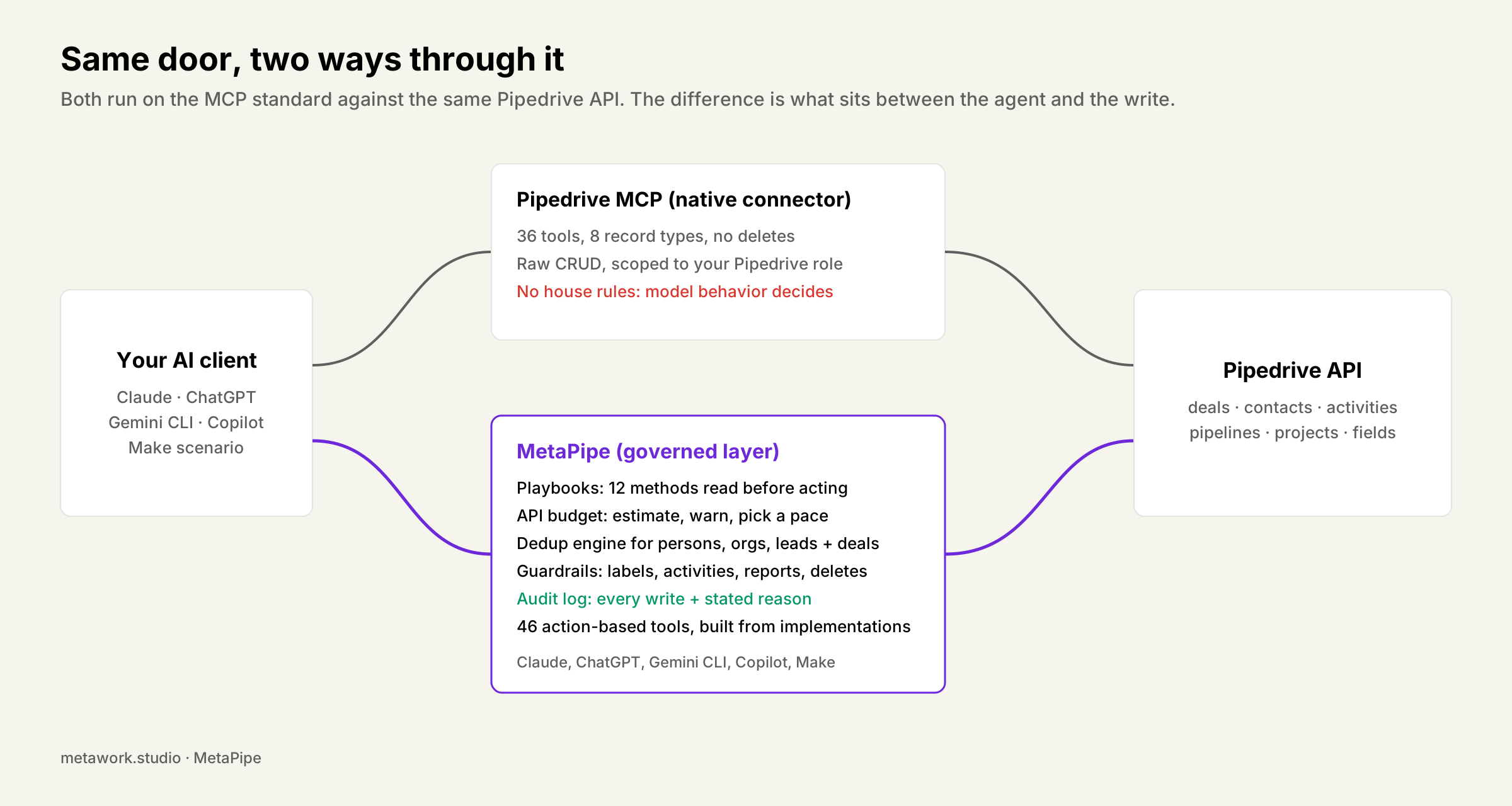
What Pipedrive’s MCP server gives you
The tool list is public and specific (KB, updated September 23, 2026): 36 tools across eight record types. Deals, persons, organizations, leads, activities, products, stages and notes, with read, add, update and search on each, plus lead-to-deal conversion.
Two things stand out in that list:
There are no delete tools at all, and credit where due: that’s real restraint, the same rule we hold ourselves to.
It stops at core CRM records. No projects, no filters, no custom field management, no files, no email tools, no reports and most notably: no best practices.
Where raw access runs out
A few places where we expect it to be funky:
Labels. Ask Claude to “add these three labels to this deal” and the safe way is fetch the current labels, merge, write the union back. The unsafe way, which an assistant with no house rules picks half the time, is to write exactly the three you named and silently drop the rest. Pipedrive’s MCP has no opinion on which one happens. Meaning labels might get dropped every now and then.
Orphaned activities. “Log a call about the Acme renewal” can, over raw access, produce an activity linked to nothing. No deal, no person, no org, because nothing forced the anchoring question. A few months of casual use later, your Activities tab is full of records nobody can trace.
Address fields. Postal code, city and country are components of one address field in Pipedrive’s data model, not separate fields. A model working from the raw schema will invent a field id that doesn’t exist, or paste a full address as one string that silently skips geocoding. Both look fine until someone filters by region.
None of this is Pipedrive being careless. It’s just not in the scope for a general-purpose MCP.
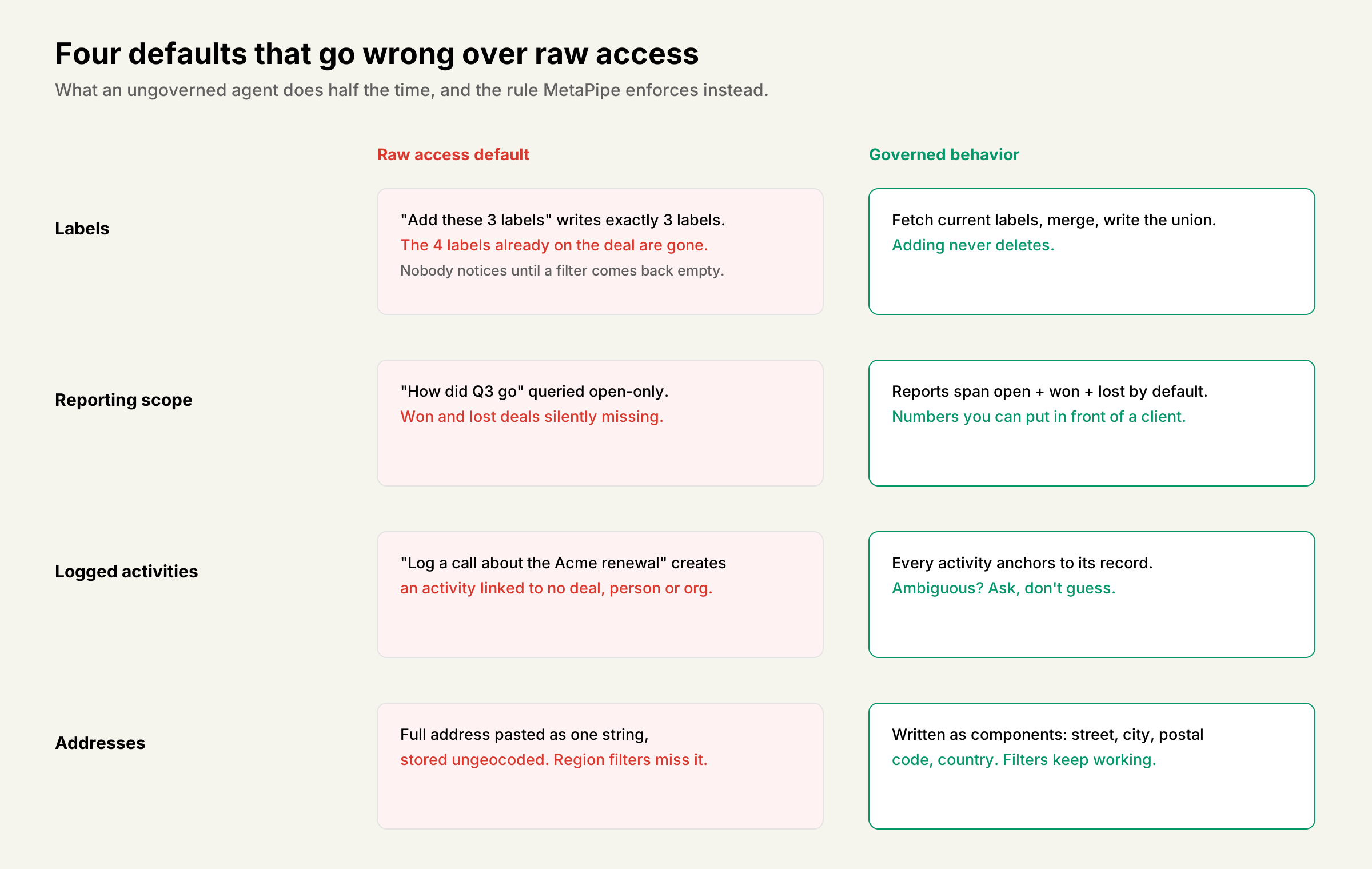
What MetaPipe adds on the same connection
MetaPipe is a bit different: it ships with the method, not just the access.
Playbooks: the know-how is baked in. Before MetaPipe imports a file, it runs our 17-rule import method: prep the fields and stages first, clean and dedupe the source file, split addresses into component columns, count-verify at the end. So 20,000 contacts land the way a consultant would land them, not the way a model guesses.
Same for pipeline design, custom fields, saved filters, automation specs and data safety: twelve playbooks from a decade of implementations, read by the agent before it acts. The native MCP relies on AI’s capabilities and your own experience with CRM hygiene.
Your API budget survives bulk work. Pipedrive meters every integration on your account against one shared daily token budget. Nothing in the native MCP stops an agent from burning through it on a big job, taking your other integrations down with it for the day. MetaPipe estimates the run first, shows you the cost, and asks which pace you want: aggressive, moderate or background. When a file import would do the same job for zero tokens, it says so.
Deduplication that works. Pipedrive’s built-in dedup checks exact matches, one pair at a time, with a painful clickery to confirm each merge. Literally every client we have struggles with it. MetaPipe ships its own dedup engine for persons, organizations, leads and deals in bulk, because cleaning up duplicates is the first job on almost every CRM we take over.
Guardrails for the mistakes you won’t see coming. We baked in our decade of CRM experience into MetaPipe, which makes the MCP do what we would on a regular agency retainer. Deletes go through recipes, not raw calls: MetaPipe offers users a way to run deletes by manually launching a script. Each playbook and guardrail is built on a mess a real client paid someone to sort out.
Coverage and reach. 46 action-based tools, covering everything the native list stops short of: projects, filters, custom fields, files, email, payments, reports. On top of that, we made tools that review your sales calls, dedupe your CRM and automatically file emails to respective deals, leads and projects.
Side by side
| Pipedrive’s own MCP | MetaPipe | |
|---|---|---|
| Setup | One click from Claude’s marketplace; URL paste in other clients | Browser sign-in (solo) or license key (teams), minutes |
| Price | Included on all plans, metered by your plan’s API tokens | $39/month solo, $29/seat for teams of 5+ |
| Status | Live in Claude’s marketplace since Aug 18, 2026; manual flow still labeled BETA | Generally available since May 2026 |
| Clients | Claude (marketplace), ChatGPT (guide), any MCP client via URL | Claude (claude.ai, Desktop, Cursor), ChatGPT desktop, Gemini CLI, Microsoft Copilot, GitHub Copilot |
| Permissions | Inherited from your Pipedrive role | Inherited from your Pipedrive role |
| Best practices | None; the model improvises | 12 playbooks: import, pipeline design, fields, filters, automations, data safety |
| Bulk work / API budget | Burns the shared daily budget unwarned | Estimates first, asks the pace, offers the zero-token file importer |
| Dedup | None (and Pipedrive’s native tool is weak) | Bulk dedup engine for persons, organizations, leads and deals |
| Audit trail | Change log (what changed) | metapipe_audit_log (what changed, and the stated reason) |
| Label writes | Not specified | Fetch-merge, never overwrite |
| Deletes | None exposed: read, add, update only | No raw deletes; deletion recipes for safe teardown |
| Unlinked activities | Not prevented | Blocked; must anchor to a record |
| Reporting scope | Whatever the prompt happens to ask | Open + won + lost by default |
| Orchestration | One chat request at a time | Chat, agent, or unattended via Make |
| Coverage | 36 tools, 8 record types; no projects, filters, fields, files, mail | 46 action-based tools incl. projects, filters, fields, files, mail, payments, reports, dedup |
Where the table says “not specified”: we could not verify Pipedrive MCP’s behavior on label overwrites or activity linking from public documentation, so we’re not assuming the worst. We’re noting that no safeguard is stated.
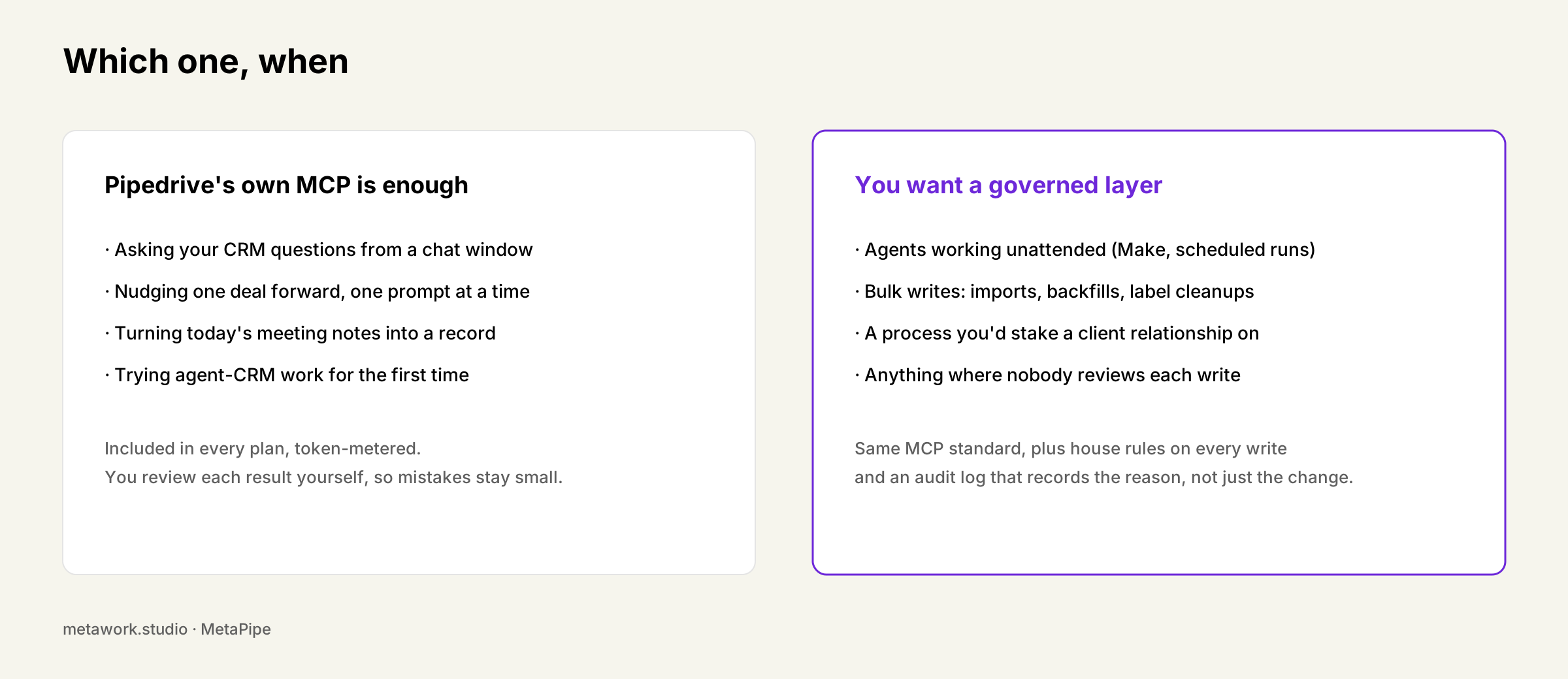
The honest verdict
Pipedrive’s own MCP server is solid. It’s one click away in Claude’s marketplace, it’s fine for that, and it costs nothing extra. We’re not going to manufacture a reason you need MetaPipe there.
It stops being enough the moment an agent works unattended, if you want it to handle CRM management flawlessly, or the moment the work touches projects, filters, custom fields, files or email, where the native tool list simply ends.
MetaPipe is opinionated MCP, built from running Pipedrive for clients since 2014, not from just covering the API.
We install MetaPipe alongside the CRM setups we build for DACH sales teams, usually wired into Make so the routine work runs without anyone prompting it. If you want to see what a governed agent layer looks like on your own pipeline, MetaPipe has a 30-day trial, and the deep dive plus our Pipedrive 2026 roundup cover the rest.