 Metabrain
 MetaPipe
 MetaHub
 Pipedrive
 HubSpot
 Make & Integrations
 Company Brains (MCP)


Pipedrive’s September and October releases change how your data is structured and governed, not what the screens look like. Leads now get archive reasons and a rotting flag. Activities get custom fields. Admins get real control over automations and AI access.
For the first time in a while, a release batch makes Pipedrive data easier for an AI agent to read. It is also uneven. Some features are fully enforced through the API, one is invisible to it, and one works in the API while the docs say nothing. This follows our summer roundup and covers everything since August.
Lead archive reasons: useful, and they break integrations
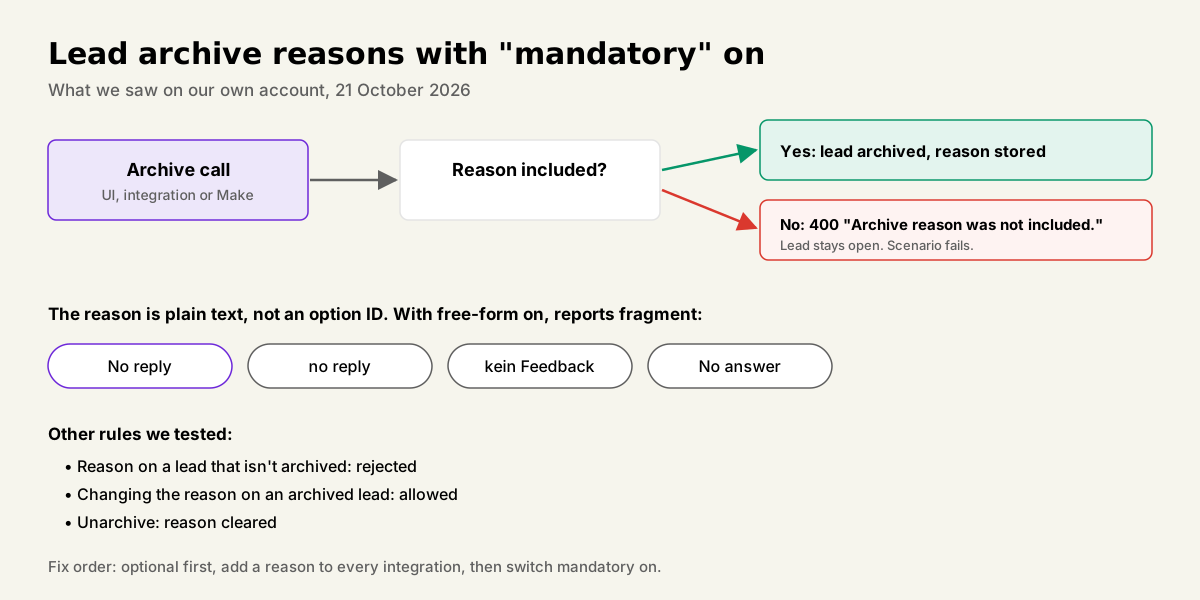
Archive reasons are live and enforced through the API, but they are not in the help center yet. You find them under Company settings, Leads Inbox tab. Admins keep a predefined list and get two toggles: allow free-form reasons, and make a reason mandatory.
We tested it on our own account on 21 October with a throwaway lead:
- Archive without a reason, mandatory on: rejected with “Archive reason was not included.”
- Set a reason on a lead that isn’t archived: rejected.
- Archive and set “duplicate” in one call: works.
- Change the reason on an archived lead to free text: works.
- Unarchive: the reason is cleared.
Two catches. The reason is stored as plain text, not as an option ID, so with free-form on your reporting splits into “No reply”, “no reply” and “kein Feedback”. And mandatory mode rejects every integration and Make scenario that archives leads without sending a reason. The call fails with a 400 error and the lead stays open.
If you built a custom “lost reason” field on leads, like we did on our own account, it now duplicates the native one. Migrate the values, then switch the old field off.
Lead rotting: one number for the whole account
Lead rotting flags leads with no activity after a set number of days. Pipedrive announced it in October. The setting sits in the same Leads Inbox settings tab: one checkbox and one value for days without activity. Ours is set to 30. A flagged lead gets a red mark that clears once someone logs an activity or the lead moves on.
It is one threshold per account. Deals rot per stage, but leads have no stages, so there is no per-source or per-label threshold.
The bigger gap is the API. When we checked on 21 October, lead records did not expose any rotting value, including leads untouched since 2025. Deals expose a rotten time and leads don’t. So you can see rotting in the Leads Inbox, but you cannot filter, report or automate on it from outside.
Activity custom fields: plan them before they reach you
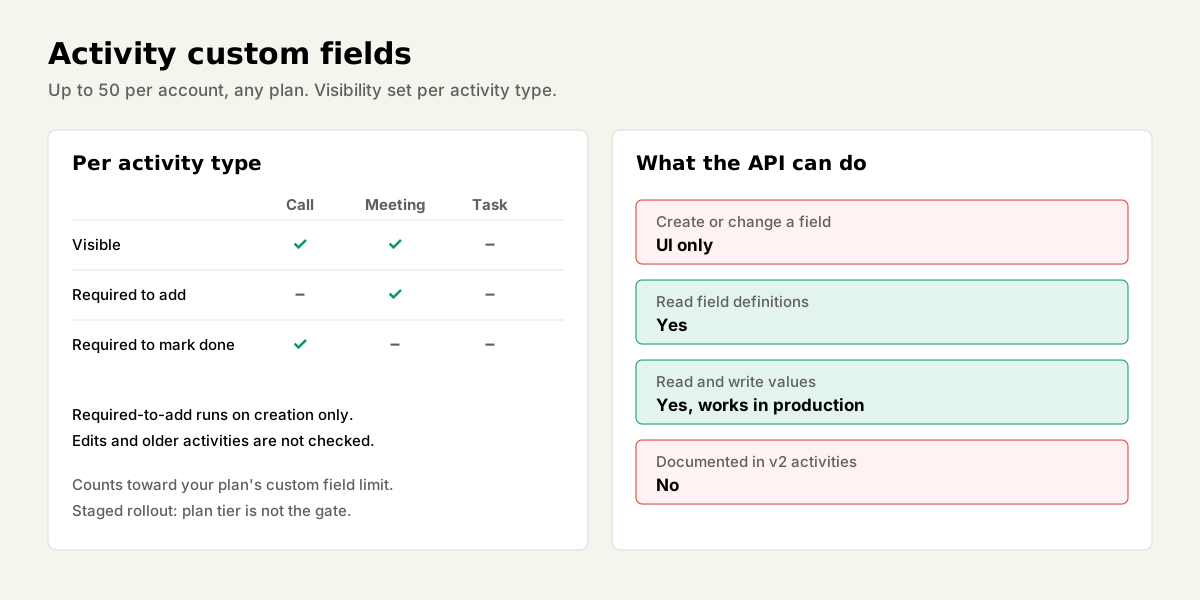
Activities can now carry custom fields, on any plan. Pipedrive’s October announcement said up to 10 per account. The help article, updated on 9 November, now says up to 50. Either way, they count toward your plan’s overall custom field limit.
You create them under Company settings, Data fields, Activity. Per activity type you control which fields show. Each field can also be required to add or required to mark as done. The required-to-add check runs only on creation. Editing later doesn’t trigger it, and it doesn’t apply to older activities.
The rollout is staged. On 21 October our own account, on Premium, did not have the option. A client account on Growth had used an activity field since early October. Plan tier isn’t the gate.
For the API, field definitions and field values behave differently:
- Field definitions can only be read through the API. You create and change them in the UI.
- The v2 activities documentation says nothing about custom fields.
- Values still read and write fine. A client’s planner sync has written an activity custom field on every synced activity since 10 October.
Even 50 fields fill up with clutter if nobody plans them. Before your account gets the feature, decide what belongs on an activity and what belongs on the deal or person. A call outcome belongs on the activity. A contract value doesn’t.
Automation governance fixes the offboarding mess
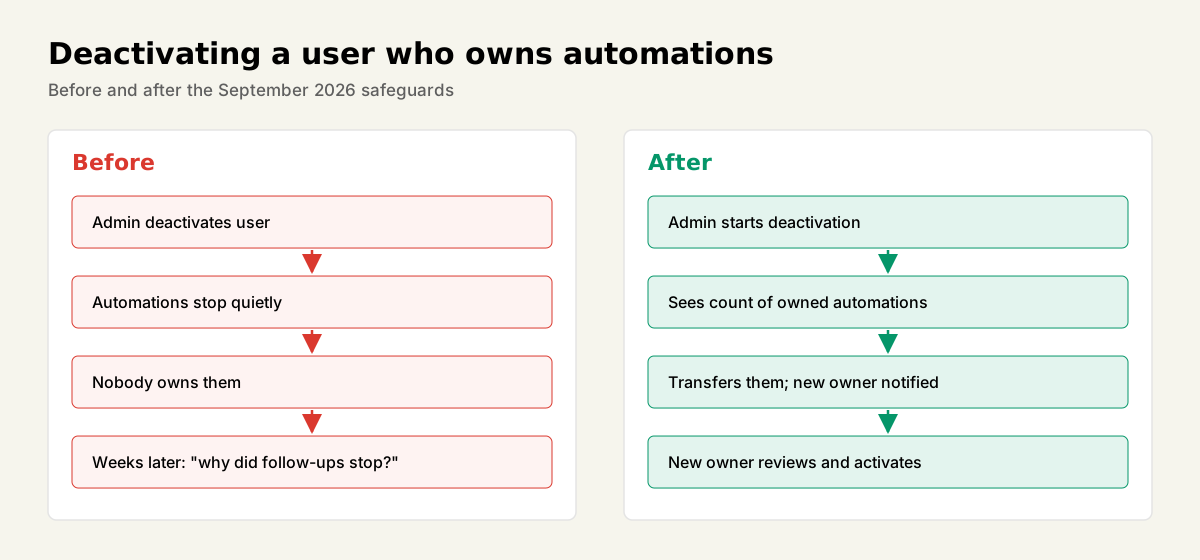
The September automation changes fix the failure we see at almost every client: someone leaves, their account gets deactivated, and automations they owned stop without anyone noticing.
What changed:
- Global admins can edit any automation without taking ownership. The owner keeps it and gets notified.
- An owner or admin can activate an automation for the whole team in one step.
- Ownership transfers notify the new owner to review and activate.
- Before deactivating a user, admins see which automations that user owns and can transfer them.
Also new: since August, an activity’s detail view shows when an automation created it. Small, but it ends a lot of “who made this task?” threads.
Duplicates, email and Insights
Duplicate matching. Admins can now define which fields and criteria count as a duplicate for people and organizations. It helps at the point of entry. It does nothing for the duplicates already in your account, and those are the ones that cost money.
Email. You can send from verified Gmail aliases. Failed sends show the provider’s reason and retry in one click. Archiving a thread in Pipedrive or Gmail now archives it in both. October added raw HTML in signatures and a default composer font.
Insights. September brought averages on custom number and money fields, several filters on one field, and dashboard templates for reps and managers. October added period-over-period comparison, a fixed currency for reports, custom sort order for chart segments, and a pipeline and stage filter at dashboard level. The fixed currency matters for any DACH team that sells in EUR and CHF.
AI access: Pipedrive’s own MCP server grows, and admins can switch it off
Pipedrive’s official MCP server, the connector that lets assistants like Claude or ChatGPT work in your account, gained leads and products in September. Assistants can now create, search, update and convert leads, and manage the product catalog.
More important for DACH readers: admins got a company setting that turns MCP access off. It blocks new connections and removes existing ones. That is a governance switch your data protection officer will want to know about. We compared Pipedrive’s server with MetaPipe in a separate shootout.
Projects, forms and the rest
- Projects. Import from Asana, Monday and Basecamp through Import2 (September). October added bulk task edits and filters, deal participants carried into projects, and project templates you can copy across boards.
- Web Forms. A resubmission from a known contact now keeps the existing owner. The form’s default owner applies only to unowned records.
- Nova. Pipedrive’s meeting assistant arrived in September. We covered it in our Nova vs Fireflies and Fathom comparison.
The scorecard
| Update | Shipped | In help center | In API | Our take |
|---|---|---|---|---|
| Lead archive reasons | Live by Oct | No | Yes, enforced | Use it. Audit integrations first |
| Lead rotting | Oct | No | No | Useful in the UI only |
| Activity custom fields | Oct, staged | Yes | Values yes, definitions read-only | Plan the fields per type now |
| Automation governance | Sep | Product page | n/a | Fixes offboarding. Turn it on |
| Duplicate matching rules | Sep | Product page | n/a | Prevents new duplicates only |
| MCP admin switch | Sep | Product page | n/a | Tell your DPO |
| Insights upgrades | Sep, Oct | Product page | n/a | Fixed currency is the sleeper |
What to do this month
Configure archive reasons now, but run them as optional for two weeks first. List every integration and Make scenario that archives leads, add a reason to each, then switch mandatory on. Move your old custom lost-reason field into the native one.
Plan your activity fields per activity type before the rollout reaches you. And fix automation ownership before your next offboarding.
The uneven API coverage is exactly the gap MetaPipe covers. It knows which Pipedrive features the API enforces, which ones it hides, and which ones only work in practice despite the docs, so an AI agent working in your account doesn’t trip over them. If you want the autumn changes set up without breaking your existing flows, talk to us.
Sources: Pipedrive product updates, Pipedrive: Activities customization, Pipedrive: Archive deals and leads, Pipedrive: Leads Inbox