 Metabrain
 MetaPipe
 MetaHub

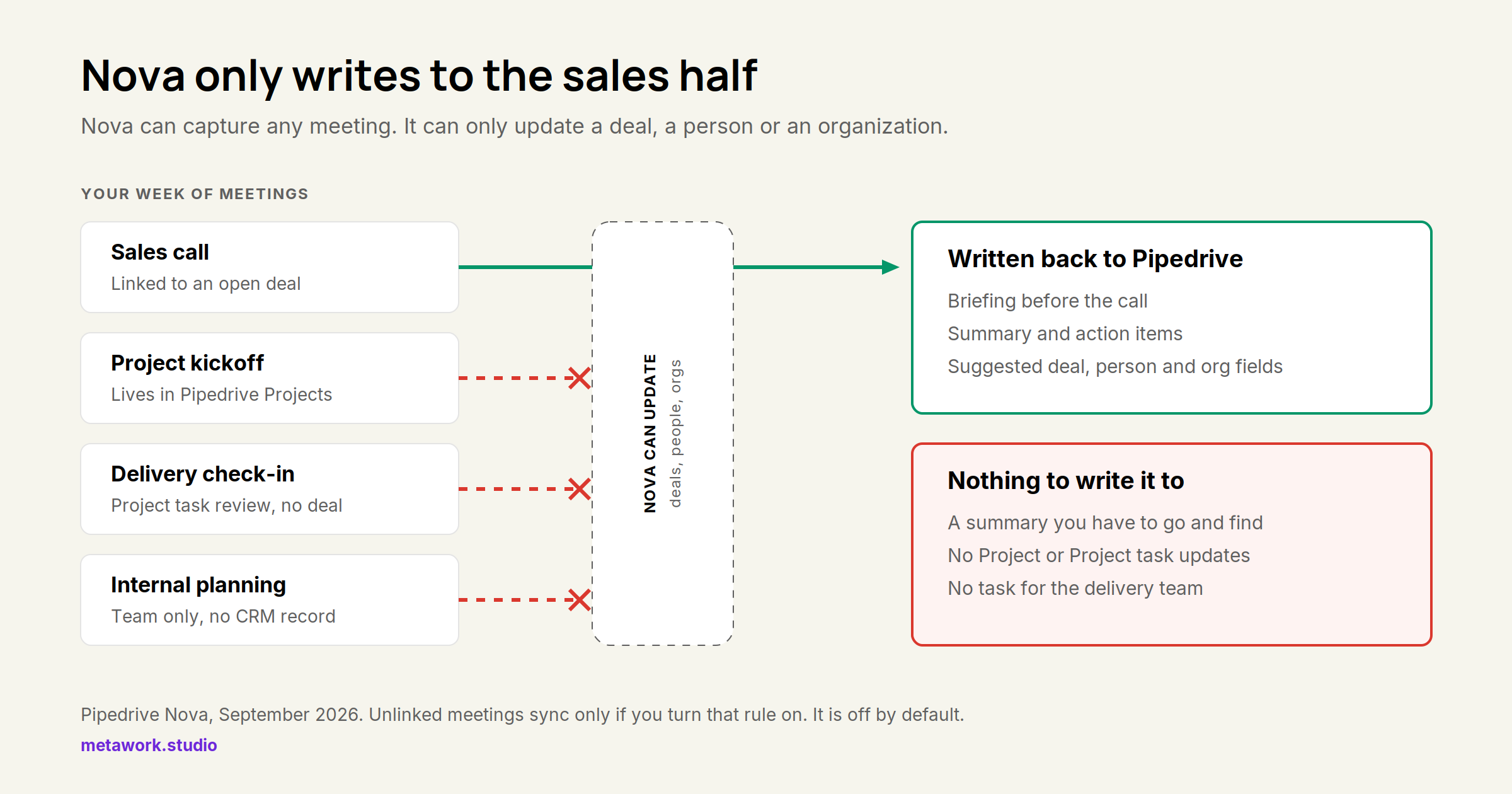
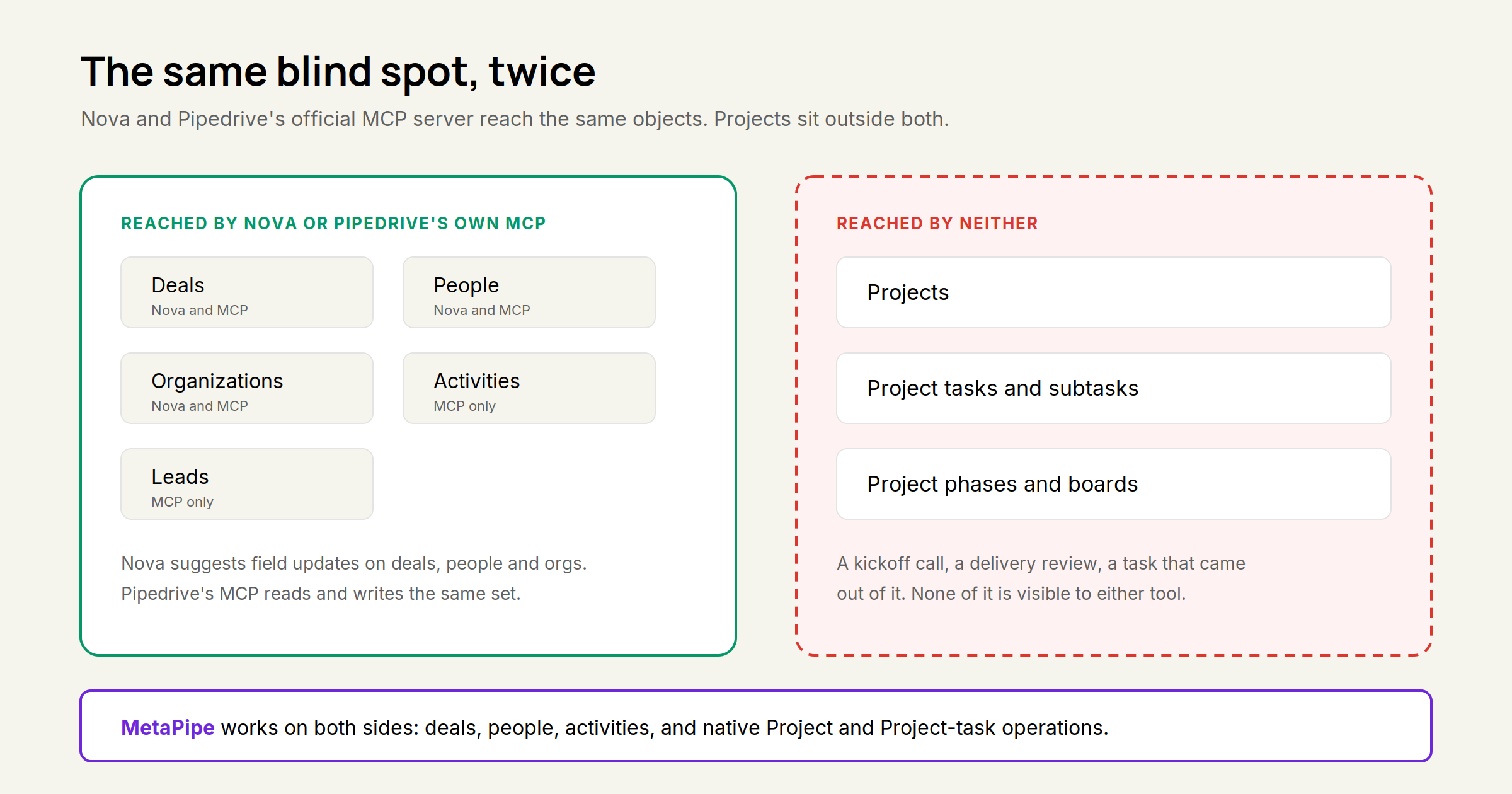
Pipedrive is now telling partners to sell Nova as “the AI assistant that just happens” and to park Public MCP as the reactive alternative for people who already have Claude or ChatGPT. That framing skips the part that actually matters for most Pipedrive customers: Nova can only write to a deal, a person or an organization. Run your delivery work in Pipedrive Projects and there is nothing for Nova to update. Pipedrive’s own MCP server has the same hole, as of September 2026. Both tools serve the sales half of a company and quietly ignore the other half.
We build on Pipedrive daily, use Projects for delivery work with several clients, and have Nova running in our own account. Everything below is checked against the live product, not a feature sheet.
What Nova actually covers
Nova went generally available on 16 September 2026 and is included in every Pipedrive plan at no extra cost, for every user, with no setup. It records either through a notetaker bot that joins Google Meet, Zoom or Microsoft Teams as a visible participant, or through the Nova Companion desktop app on macOS and Windows, which captures system audio without a bot in the room.
Which meetings reach Nova is a settings question. Under Meeting and activity syncing, four toggles decide what syncs: meetings without a linked deal, person or organization, meetings without a video link, meetings without participants, and meetings without external participants. By Pipedrive’s default, the first one is off, so a meeting that isn’t tied to a deal, a person or an organization never shows up. Turn it on and Nova will happily sync and summarize your internal syncs too.
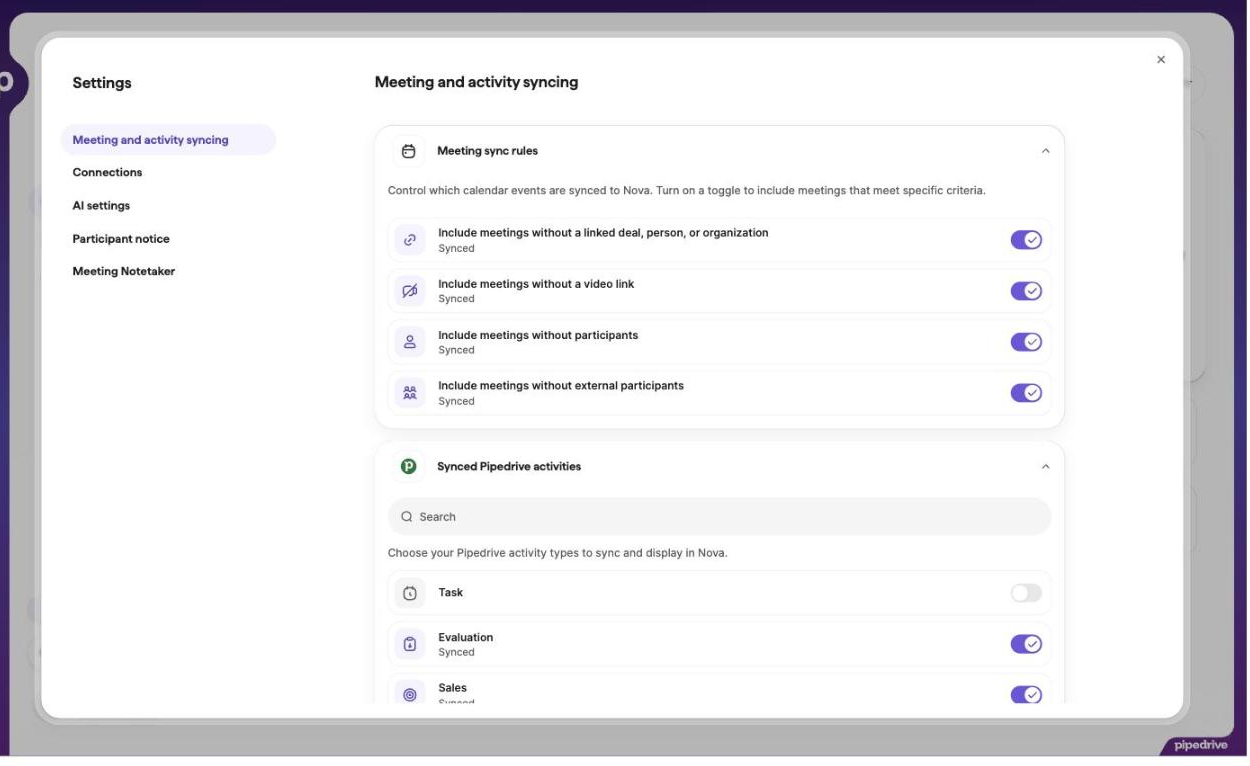
The same settings screen lets you choose which Pipedrive activity types sync into Nova. Task is off by default in our account, which is worth knowing before you assume Nova sees everything on your Activities list.
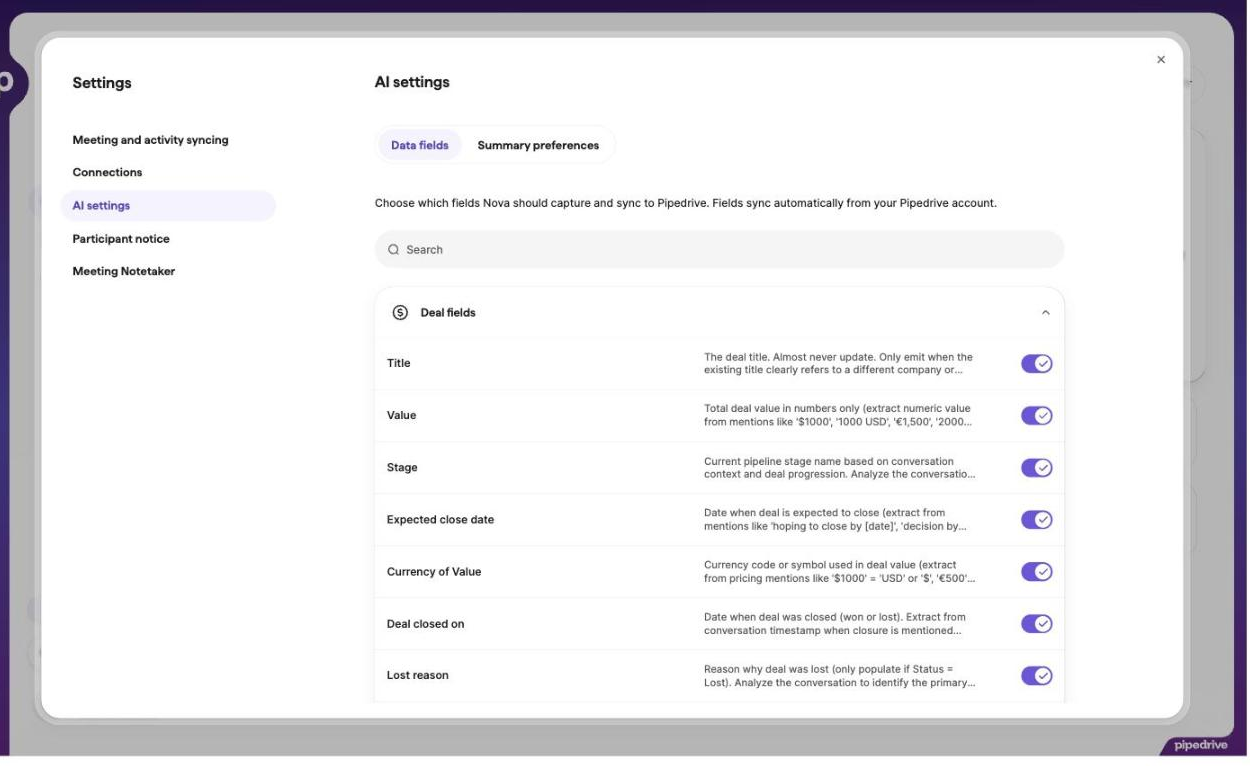
So the capture side is flexible. The write-back side is not, and that is where the real limit sits. Nova’s AI settings list exactly three groups of fields it can capture and sync: Deal fields, Person fields, Organization fields. That’s the whole surface. No project fields, no project tasks, nothing that touches the delivery side of Pipedrive.
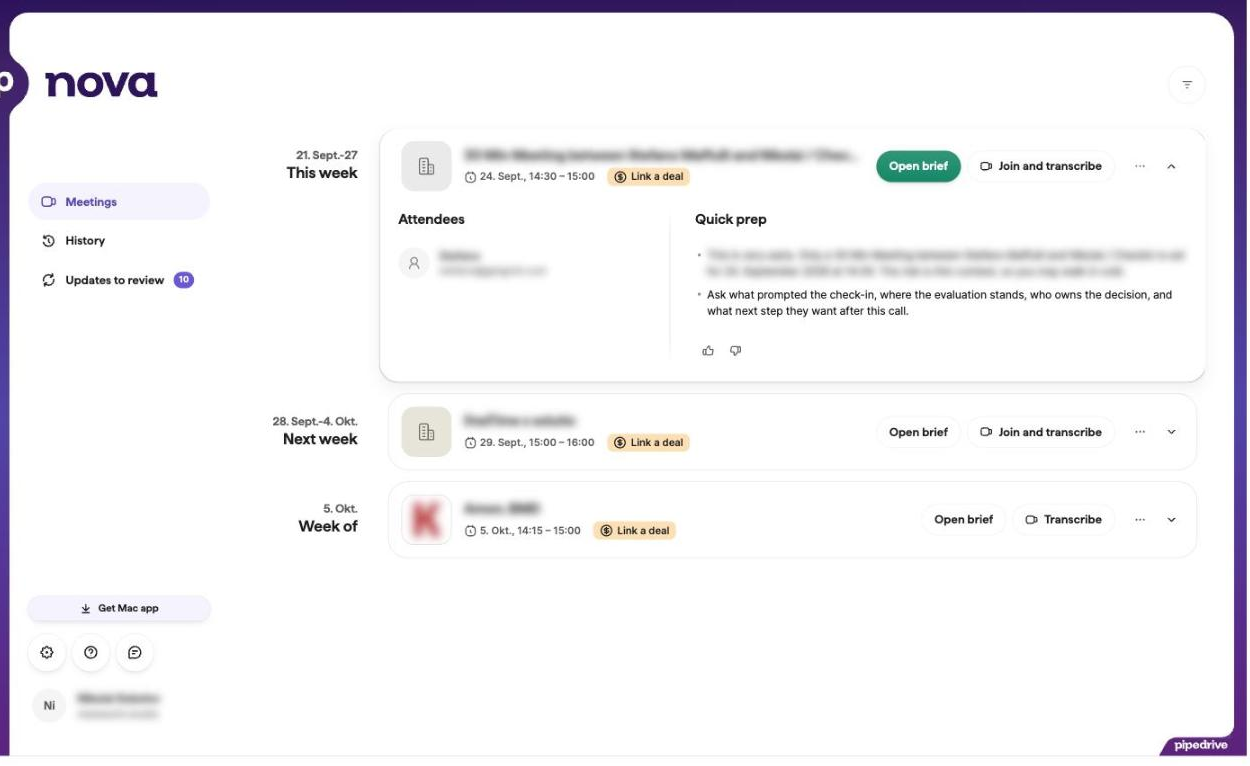
You can see both halves in the product. Upcoming meetings each carry a “Link a deal” prompt, because a linked deal is what makes the briefing and the field suggestions useful.
And in the review queue, past meetings sit there flagged “Deal not linked” with a pile of updates waiting for a record to write them to.
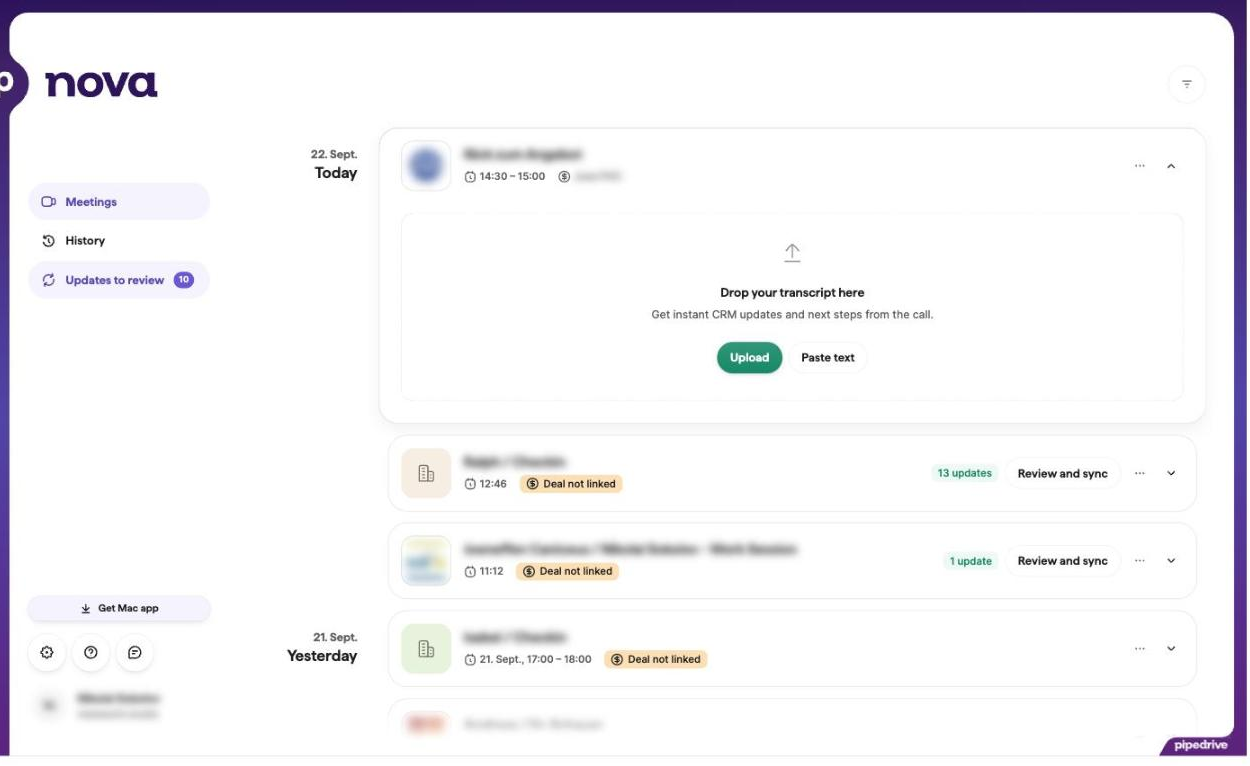
Nothing is written automatically. Every suggestion waits for a human to approve it, which is the right default.
So the honest description isn’t “Nova can’t hear your project meetings.” It can hear them, if you turn the rule on. It’s that Nova has nowhere to put what it heard. A kickoff call, a delivery review, an internal planning session: the summary lands in Nova, and not one field, task or note reaches the Project the work actually lives in.
The automated mapping is real, but narrow
Give Nova credit where it’s earned: the field-mapping into deals, people and organizations genuinely works, the extraction rules per field are visible and switchable, and zero setup is a real advantage over configuring an MCP connection per rep. That’s the whole value proposition, though. Need a task registered for the delivery team? Nova doesn’t create tasks. Want the outcome of a project review on the project? There is no field for it.
One more thing worth checking before you standardise on it: Pipedrive’s Nova documentation doesn’t state which languages transcription covers. Fireflies publishes 100+. If half your calls are in German, ask before you commit.
Where Nova is genuinely the right call
If Pipedrive is the only app where meeting recordings matter, none of the above is a real complaint. A solopreneur or a small sales-only team that never spins up a Project, never needs a delivery record, and just wants every sales call captured and written back automatically gets exactly what Nova promises: zero setup, zero cost, one less tool to manage. It also does a genuinely useful job of keeping the sales team’s meetings off Teams or Zoom’s own recording and out of a separate meeting-AI subscription entirely. The whole workflow stays inside Pipedrive, with nothing extra to pay for or configure, and no second company processing your customer conversations. That’s a real, common shape of customer, and Nova is the right call for it. It’s just not “an internal AI assistant,” and Pipedrive’s partner material blurs that line.
Pipedrive’s own MCP has the same blind spot
If the instinct is “fine, we’ll cover Projects through MCP instead,” that doesn’t work either, at least not yet. Pipedrive’s MCP server page lists deals, contacts, organizations, leads and activities as the supported objects. Projects are absent there too. An AI assistant connected over Pipedrive’s official MCP can query and update the sales side of the account and cannot touch a Project, a Project task, or a Project board through that connection. So the “MCP already does this” objection Pipedrive is coaching partners to expect doesn’t actually hold for any team using Projects. MCP and Nova share the exact same hole. We went through what the official MCP server does and does not cover in our 2026 Pipedrive roundup.
What a meeting-agnostic recorder looks like instead
Fireflies and Fathom were never built as sales-only tools with a CRM bolted on. Both record and summarize any meeting: sales calls, customer success, internal syncs, planning, delivery reviews. Both push action items into a project tool, which is the part Nova has no answer for.
They are not interchangeable on the Pipedrive side, though, and this is where most comparison posts get lazy.
Fireflies has a native Pipedrive app in Pipedrive’s own Marketplace. It logs meeting summaries, transcripts and action items under the matching contact, lead or deal, and can create a lead when a participant isn’t in the CRM yet. Action items can go to Asana, Trello, Linear, Notion or Airtable in the same pass. Transcription covers 100+ languages. Pricing runs Free (400 minutes of storage per team), Pro at $10 per seat per month billed annually ($18 monthly), Business at $19 ($29 monthly) for unlimited storage, conversation intelligence, topic trackers and talk-time analytics, Enterprise at $39. SOC 2 Type II and GDPR apply on every plan; HIPAA, SSO and SCIM are Enterprise only. Its MCP server is read-only: three tools, get_user, get_transcript and get_transcripts, so Claude or ChatGPT can read your meetings but not write anything back.
Fathom has no native Pipedrive integration. Its integrations page lists HubSpot and Salesforce on the CRM side, and there is no Fathom app in Pipedrive’s Marketplace as of September 2026. Getting a Fathom summary into Pipedrive means Zapier, n8n, or building on the public API. What Fathom does have is the strongest free tier in this comparison, unlimited recording and transcription at $0, plus public API and MCP access on every plan including free, and first-party Claude and ChatGPT connections. Paid tiers: Premium at $16 per month annually ($20 monthly) for advanced summaries and AI action items, Team at $15 per user ($19) where CRM syncs are capped at three users per domain, Business at $25 per user ($34) for automatic CRM field updates, Deal View and coaching scorecards. Action items go to Asana in one click, notes into Notion, everything else through Zapier.
The practical difference against Nova is the same for both: the action item that comes out of a delivery meeting lands somewhere a delivery team actually looks.
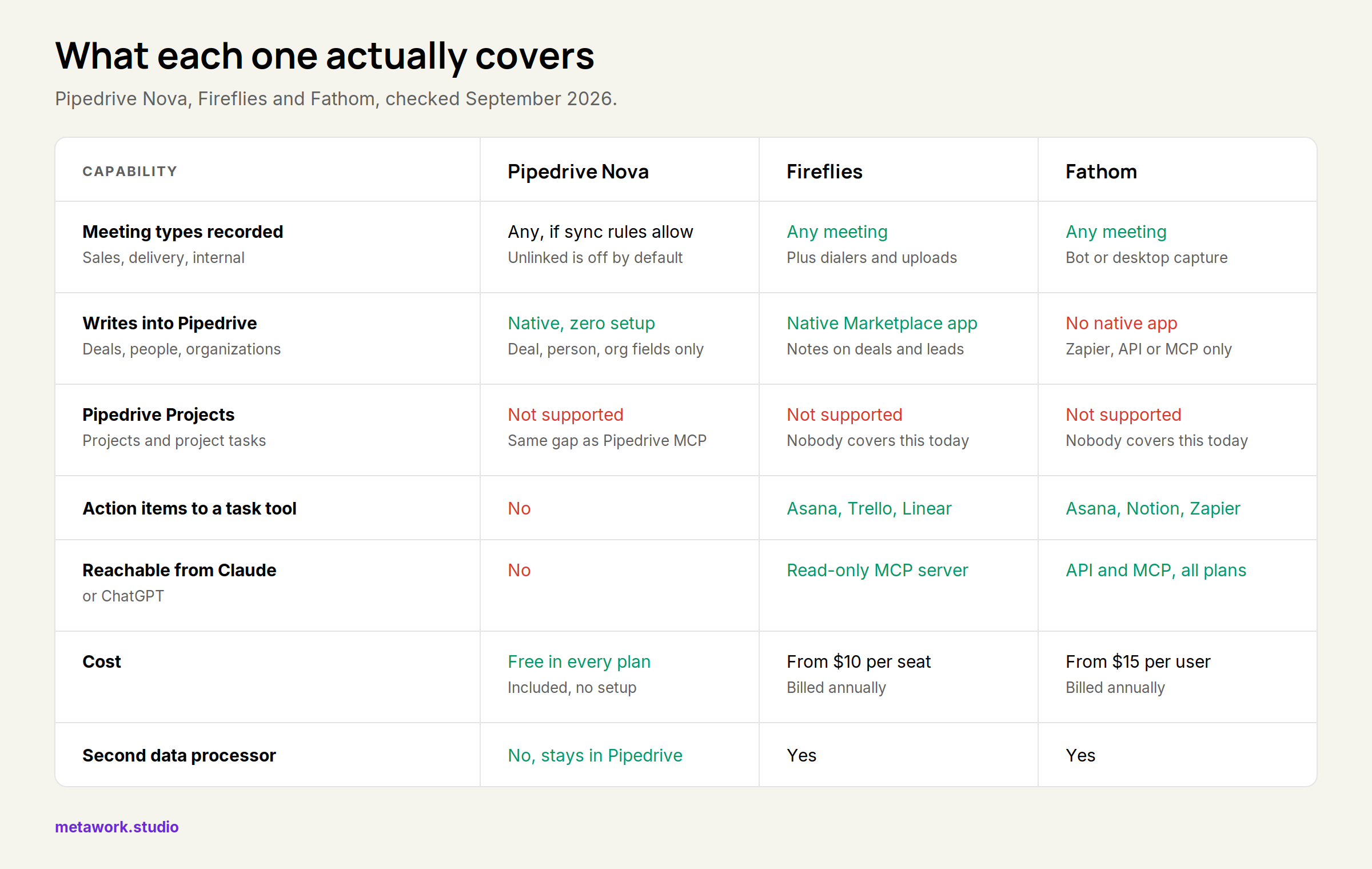
Side by side
| Pipedrive Nova | Fireflies | Fathom | |
|---|---|---|---|
| Meeting types recorded | Any, if the sync rules allow it. Unlinked meetings are off by default | Any meeting, plus dialers and uploads | Any meeting, bot or desktop capture |
| Capture method | Notetaker bot (Meet, Zoom, Teams) or Companion desktop app | Bot across 10+ platforms, plus audio upload | Bot or desktop app, no bot required |
| Pipedrive write-back | Native, zero setup: suggested field updates on deals, people and organizations only | Native Marketplace app: summaries and action items on deals, people and leads, optional lead creation | None native. Zapier, n8n or the public API |
| Pipedrive Projects | Not supported | Not supported | Not supported |
| Action items into a task tool | No | Asana, Trello, Linear, Notion, Airtable | Asana, Notion, Zapier |
| Human review before write | Required, nothing applies automatically | Configurable per integration | Automatic CRM field sync on Business |
| Reachable from Claude or ChatGPT | No | Read-only MCP server | Public API and MCP on every plan, including free |
| Languages | Not stated in Pipedrive’s docs | 100+ | Not stated on the pricing page |
| Conversation intelligence | No | Topic trackers and talk-time on Business | Coaching metrics and AI scorecards on Business |
| Cost | Free in every Pipedrive plan | Free, then $10 / $19 / $39 per seat monthly, billed annually | Free, then $16 / $15 / $25 per user monthly, billed annually |
| Second data processor | No, stays inside Pipedrive | Yes | Yes |
| Compliance | Pipedrive’s own | SOC 2 Type II and GDPR on all plans, HIPAA on Enterprise | SSO, SCIM and custom retention on Enterprise |
Worth being precise here: none of the three gives you native Pipedrive Projects support. Nobody in this comparison does, today. What Fireflies and Fathom give you is a direct line into whatever project tool the delivery team actually uses, which is the thing Nova structurally cannot do.
Prefer each one if
Prefer Nova if Pipedrive is the only place your meetings need to land. Sales-only team, no delivery work in Projects, no appetite for a second subscription or a second processor in your records. It costs nothing, it needs no setup, and the field suggestions are good. This is a bigger group of companies than partner decks admit.
Prefer Fireflies if you want one recorder for every meeting type and you want it writing into Pipedrive natively. It is the only tool in this comparison that covers both. Action items into Asana, Trello or Linear close the delivery gap that Nova leaves open, and the language coverage is documented, which matters for any team selling across DACH and the US.
Prefer Fathom if your CRM is HubSpot or Salesforce, or if you want meeting data inside Claude and ChatGPT more than you want a native Pipedrive app. The free tier is unusually generous and MCP access is not gated behind a paid plan. For Pipedrive specifically, budget for a Zapier or API step.
None of them solves it if the record that needs updating is a Pipedrive Project or a Project task. That gap is still open.
Verdict
Nova is a fine tool, genuinely, for one shape of company: a solopreneur or a sales-only team that wants proactive call prep and CRM hygiene at no extra cost, doesn’t run delivery through Pipedrive Projects, and would rather keep every sales meeting inside Pipedrive than add Teams or Zoom recordings or a separate meeting-AI subscription to the stack. For that company, Nova plus zero AI coverage on anything that isn’t a deal is a reasonable trade, and the zero-processor, zero-cost pitch is genuinely strong.
For anyone running delivery through Pipedrive Projects and wanting one meeting AI across sales and delivery, Nova isn’t that tool, and reaching for Pipedrive’s own MCP instead doesn’t close the gap. It hits the identical Projects blind spot. A meeting-agnostic recorder with real project-tool integrations gets you further, even though it still can’t write into Projects natively.
That last gap is exactly where an AI agent wired directly into Pipedrive’s API, rather than a meeting recorder guessing at CRM fields, has room to do more. MetaPipe’s Pipedrive tools already include native Project and Project-task operations alongside deals, contacts and activities. The same agent that logs a sales call can create and update a Project task, because it isn’t limited to the object types Pipedrive decided to expose through Nova or the official MCP server.
Sources
Facts checked 22 September 2026. Screenshots taken the same day in our own Pipedrive account, client names and emails blurred.
- Pipedrive Nova: overview and Pipedrive Nova: meetings
- Pipedrive launches Nova, generally available 16 September 2026
- Pipedrive MCP server: deals, contacts, organizations, leads, activities
- Fireflies pricing, Fireflies for Pipedrive and the Fireflies app in Pipedrive’s Marketplace
- Fathom pricing and Fathom integrations: HubSpot and Salesforce on the CRM side, no Pipedrive app