 Metabrain
 MetaPipe
 MetaHub

What’s New in Pipedrive in 2026: Every UI Update, Where It Breaks, and the MetaPipe Fix
Pipedrive’s 2026 releases so far all point the same direction: faster clicking, not less clicking.
Every update below is a real UI improvement, and several are overdue. But it is UI only. Each one makes a screen quicker for the human sitting in front of it, which is counterproductive to a degree.
That distinction matters more this year than any single feature. An agent wired to Pipedrive over MCP was never limited by the click in the first place. It needed write access, and it already has that.
So for every update below we give you three things: what shipped, where it breaks, and what the same job looks like when an agent does it through MetaPipe, our MCP layer for Pipedrive.
Automatic email logging finally works, if you send from Pipedrive
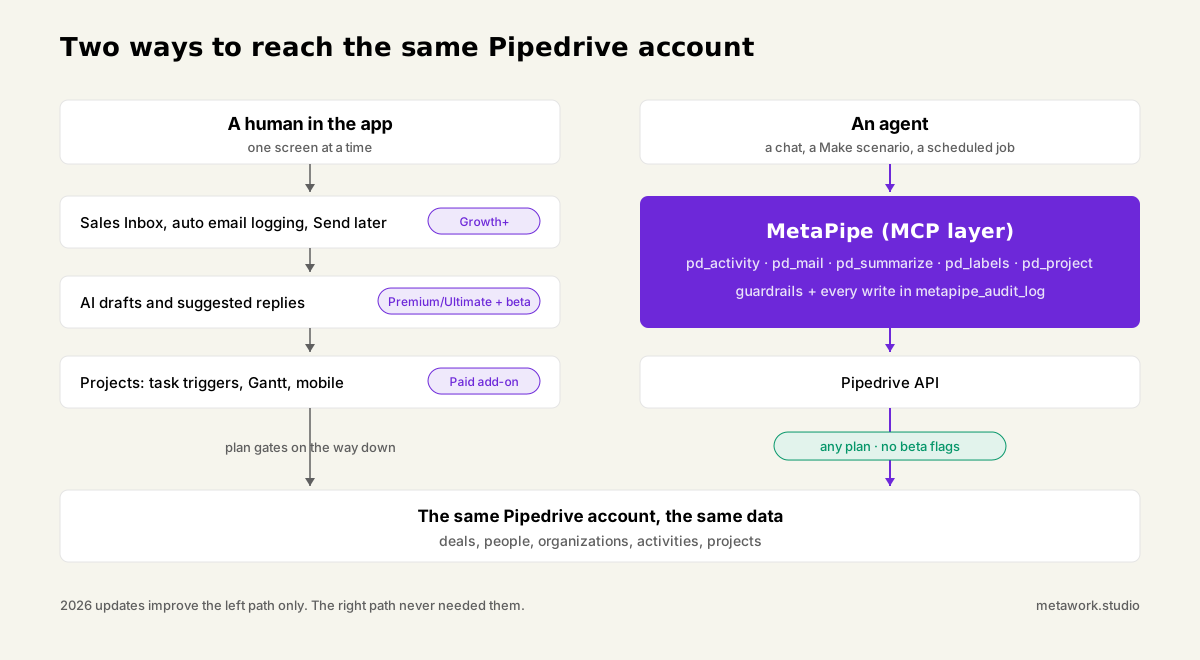
The oldest reporting complaint in Pipedrive is fixed, with an asterisk. Since March 2026, emails sent from Pipedrive’s own composer can log themselves as activities at send time, and a bulk “Add activity” action in the Sales Inbox catches externally sent mail retroactively. Before this, logging was a per-email checkbox everyone forgot.
Our score: 4/5. It answers a question we get from almost every client: how many sales-relevant emails did each rep actually send?
Where to find it: Account menu > Personal preferences > Email sync > General for the toggle. The bulk catch-up lives in Sales Inbox > Sent folder > select conversations > “Add activity”.
Where it breaks: email sync requires the Growth plan or higher. And auto-logging only covers mail sent through Pipedrive’s composer. Anything sent from Gmail, Outlook or Smart BCC still needs a human to run the bulk action. It does not log itself.
The MetaPipe angle: pd_activity creates a properly linked activity. Deal, person and organization attached, per our own “link it, don’t strand it” rule. It doesn’t care which mailbox sent the email or which plan you’re on, because it calls the API directly instead of routing through a plan-gated toggle. A scheduled job can decide which threads deserve an activity and create them all, on your schedule.
Pulse and AI Suggested Replies: reply hints without judgment
Pipedrive now nags you about unanswered email in three places, and all three lack context.
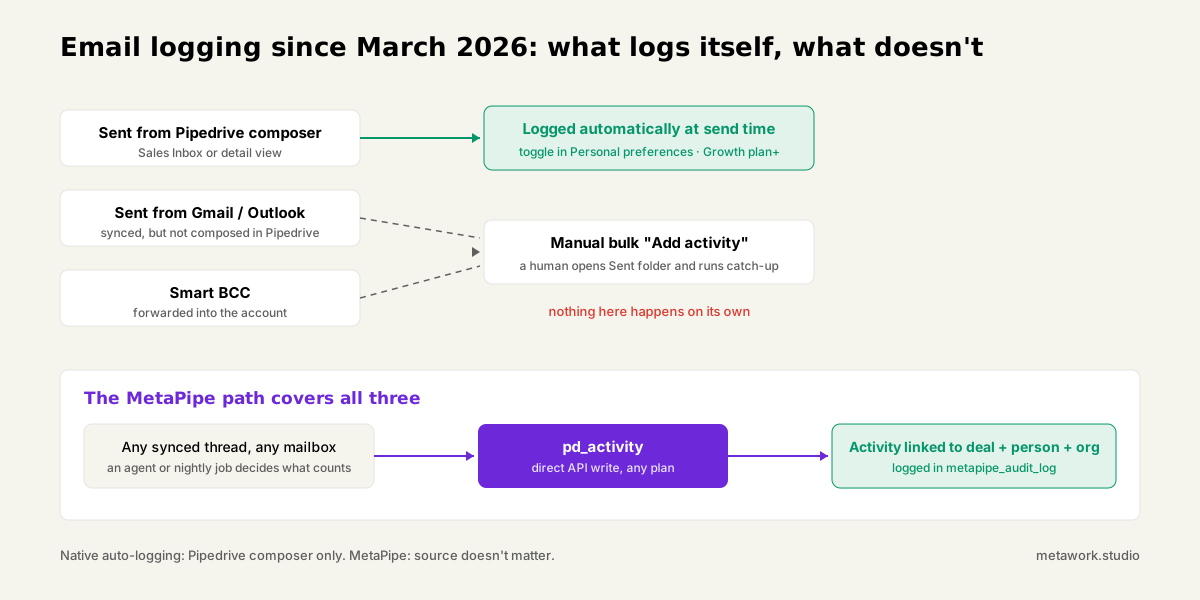
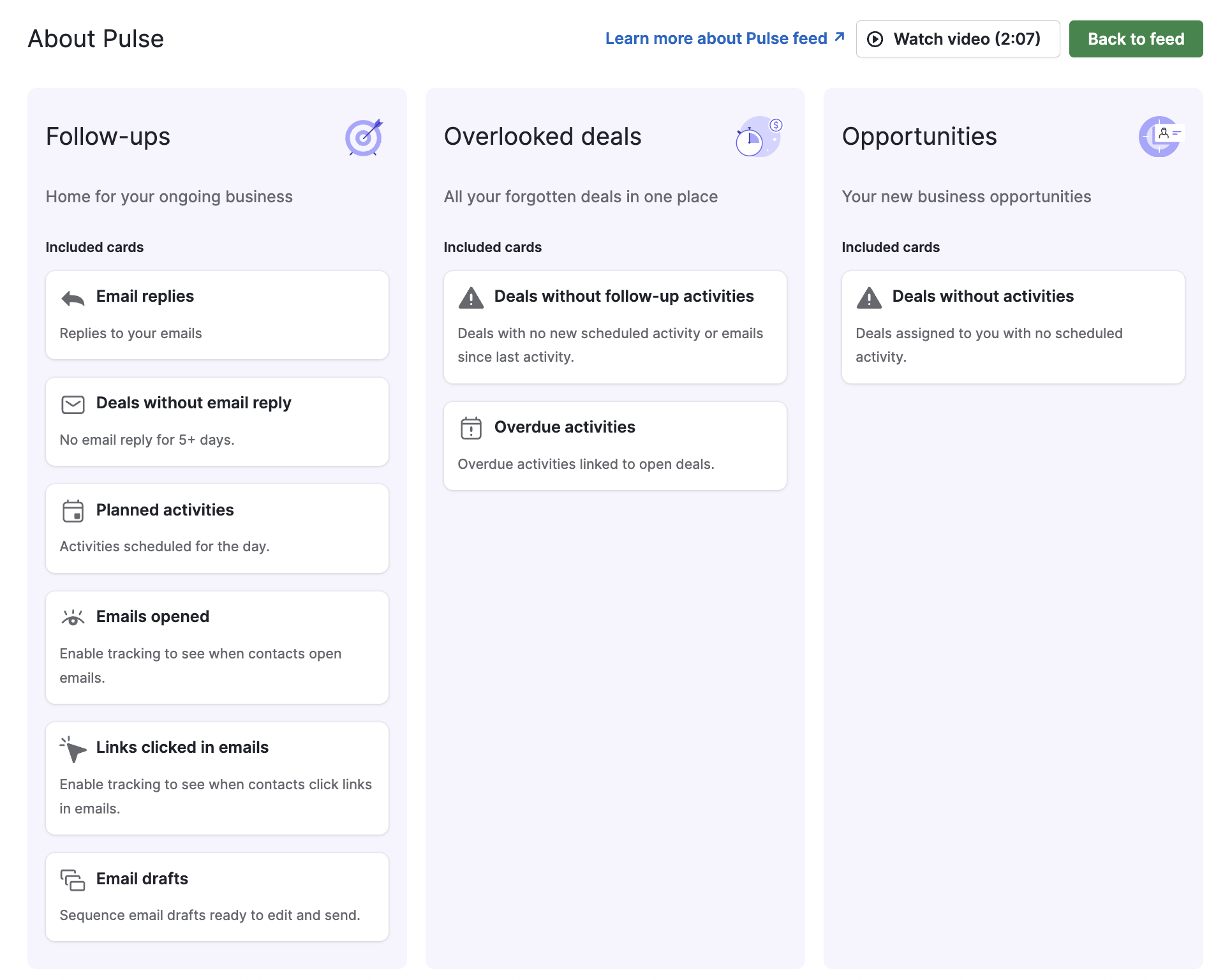
The Pulse feed’s Follow-ups tab surfaces deals with no reply after 5 days. Pipedrive’s own docs are refreshingly honest that this is “fixed rules and time triggers”, not AI. Deal cards in the pipeline view get a small Reply? button when a thread is waiting. And AI Suggested Replies drafts an answer inside the Sales Inbox, if you’re on Premium or Ultimate and enrolled in the beta.
Our score: 2/5. The hints are real, the judgment isn’t. Pulse doesn’t weigh deal value, urgency, or whether the email still needs an answer at all. A five-day clock treats a €90k proposal and an out-of-office loop identically. And the AI drafts read like AI drafts: one thread of context, canned tone. Pipedrive itself says suggested replies “may not appear until you’ve been using Pipedrive for a few weeks”. The feature has to warm up before it works.
The MetaPipe angle: pd_mail finds every thread awaiting a reply on demand, not on a 5-day timer, and pd_summarize pulls the deal’s full activity, note and email history so a draft reflects the whole relationship. Works on any plan, no warm-up. And because MetaPipe runs under your AI of choice, the drafts sound like you, not like AI chat bot.
Send later is just good
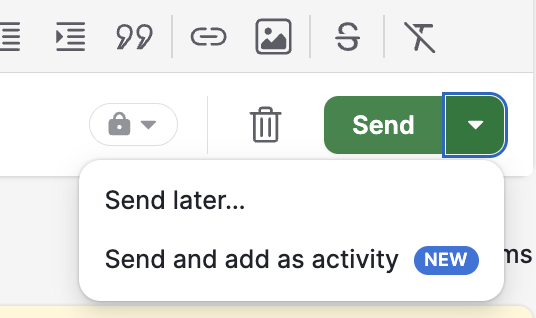
Credit where due: scheduled sending shipped, and it’s the most useful small feature of the year. Pick a time from the arrow next to Send; the email waits in the Outbox until it fires. 5/5.
Where it breaks: you can’t edit a scheduled email, only cancel it back to drafts and start over. No recurring sends. And it rides on email sync, so Growth plan and up.
No MetaPipe pitch here. Pipedrive’s native version is fine for single scheduled emails, and we tell clients to use it. What MetaPipe adds sits upstream: deciding which emails are worth sending and writing them in your voice.
Lead labels survive conversion, but only from now on
An opt-in setting now carries a lead’s labels onto the deal it becomes. Admins find it under Settings > Company Settings > Labels. Our score: 4/5, because keeping two separate label sets on leads and deals while still carrying context across conversion is exactly right.
Where it breaks: Pipedrive’s own help article states it plainly. The setting is not retroactive. It applies only to conversions after you flip it, only an admin can flip it.
The MetaPipe angle: pd_labels applies labels to deals in bulk, right now, including every conversion that happened before anyone remembered the setting existed. It fetch-merges instead of overwriting, so a backfill can’t wipe what’s already there. That closes exactly the “not retroactive” gap the documentation admits to.
Bulk change revert: the undo button arrives
Since March 2026 you can undo your own bulk edits within 30 days under Settings > Tools and Apps > Restore Data. That’s great news.
Where it breaks: it’s recovery after the fact, and it covers Pipedrive’s native bulk-edit tool, not writes made by integrations.
The MetaPipe angle: metapipe_audit_log records every write the assistant makes. Tool, action, target, success, and the stated reason. The record exists before anything goes wrong, whether or not it ever does. The best part: this goes for imports and changes beyond what restore data can address. Changed a field value on 1000 records by mistake? No problem. Your AI app will recover and undo anything you asked it to do in minutes.
Projects grew up: task triggers, Gantt, and tasks in your Activities list
Projects had its best year since launch. Since March 2026, Automations can fire when a project task is created, completed, assigned, overdue or updated. The Gantt view is live with day-to-year scales, drag-to-reschedule and dependency arrows.
Since June, your assigned project tasks show up in the regular Activities list (big yaaay from us!), so you stop opening Projects to check them.
An Android app shipped in April; we haven’t seen an iOS release yet.
Where it breaks: There is no judgment about what a completed task should mean for the deal attached to it. You can’t save something into a deal linked to a project through workflow automations.
The MetaPipe angle: pd_project gives an agent the same task and phase visibility, queryable from a chat or a Make scenario, and the agent can act on task state with actual reasoning: create the next activity, update the linked deal’s stage, or tell the right person. Not just fire a pre-built rule.
Automations grow safety rails
Since April, Pipedrive automations alert you when they fail repeatedly and auto-deactivate rather than fail silently forever. May added the bigger piece: a health dashboard showing runs, failures and trends at a glance, in-product banners when you’re near frequency limits, and guardrails that block you from deleting a field, webhook or email account a live automation depends on.
Our score: 3/5. Real relief for anyone who has debugged a silently broken automation from a support ticket instead of a dashboard. It’s still reactive, though: the system tells you what already failed, it doesn’t reason about why or what should happen instead.
Where to find it: Automations > Overview for the health dashboard; the deletion guardrails and frequency banners surface automatically wherever they apply.
Where it breaks: it’s monitoring, not judgment. A dashboard telling you an automation failed 40 times overnight is strictly better than silence, but it still can’t tell you whether the underlying rule was ever the right one.
The MetaPipe angle: this is what metapipe_audit_log was already doing before Pipedrive built a dashboard for its own native automations. It covers every write an agent makes, not just the ones that ran inside Pipedrive’s own automation engine, and every entry carries the caller’s stated reason, not just a pass/fail. Your AI will pull from your own reasoning instead of a fixed workflow build.
WhatsApp for Business integration, faster automation building
July’s release was mostly quality-of-life for people who build in Pipedrive all day. WhatsApp is now a channel inside Pipedrive itself: send, receive and reply without leaving a deal, alongside email and call history. That’s huge for european customers.

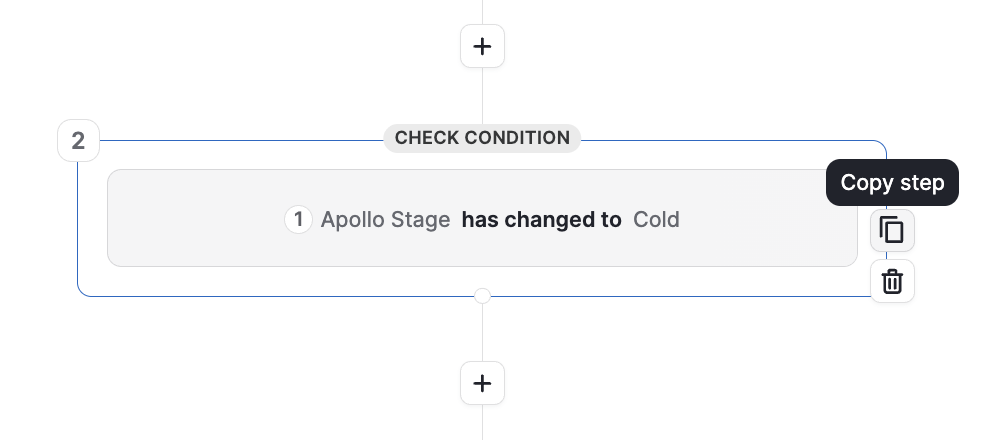
The automation canvas got copy/paste for steps, so branching workflows stop being rebuilt from scratch (another huge hooray from us). We’ve been asking for this feature for years because we’ve been building thousands of workflows.
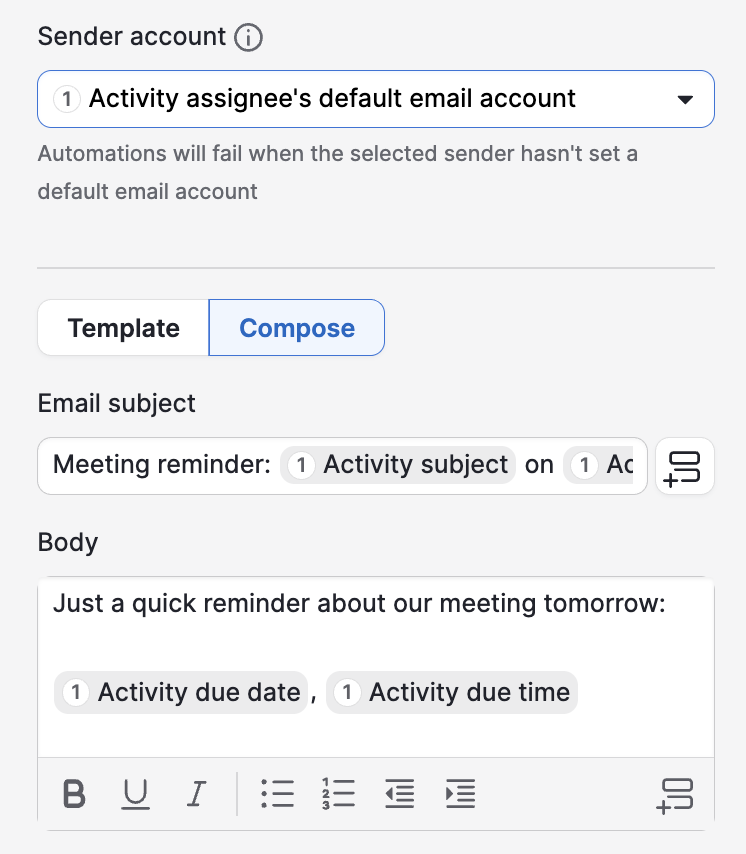
Automated emails can now be sent as the automation owner, the deal owner, the triggering user or a shared Team Inbox, so one workflow can serve a whole team instead of forking per rep. And you can preview an email template’s real design inside the automation builder instead of guessing from its title.
Our score: 5/5. Every one of these features was long due and closes a real gap.
Where to find it: WhatsApp connects under Settings > Communication channels once your number is provisioned. Copy/paste and template preview are inline in the Automations canvas; sender control is a new field on any automation’s email action.
The MetaPipe angle: an agent already treats a WhatsApp thread the same as an email thread once it’s linked to a deal, no separate integration logic needed. And where Pipedrive’s automation canvas got faster to build in, MetaPipe skips the canvas: pd_project and pd_activity let an agent make the branching decision live, in the moment, instead of pre-authoring every branch in advance.
August: the polish sprint
August was Pipedrive tightening a dozen small screws at once. Deal cards now show the stage name and day count directly on the progress bar, no more hovering to check.

A persistent toggle finally lets you see closed (won and lost) deals in pipeline and list views instead of only open ones. Admins can hide AI deal-scoring from reps who find it distracting.

Web Forms can now pull UTM parameters, referral URLs, landing pages and JavaScript variables straight into hidden fields, so attribution stops depending on someone remembering to ask. Email got failed-send tracking with one-click retry, automatic deal-participant recipients when you compose from a deal, and merge fields that work inside hyperlinks, not just body text. And Sequences can now enroll up to 500 contacts at once, up from 100.
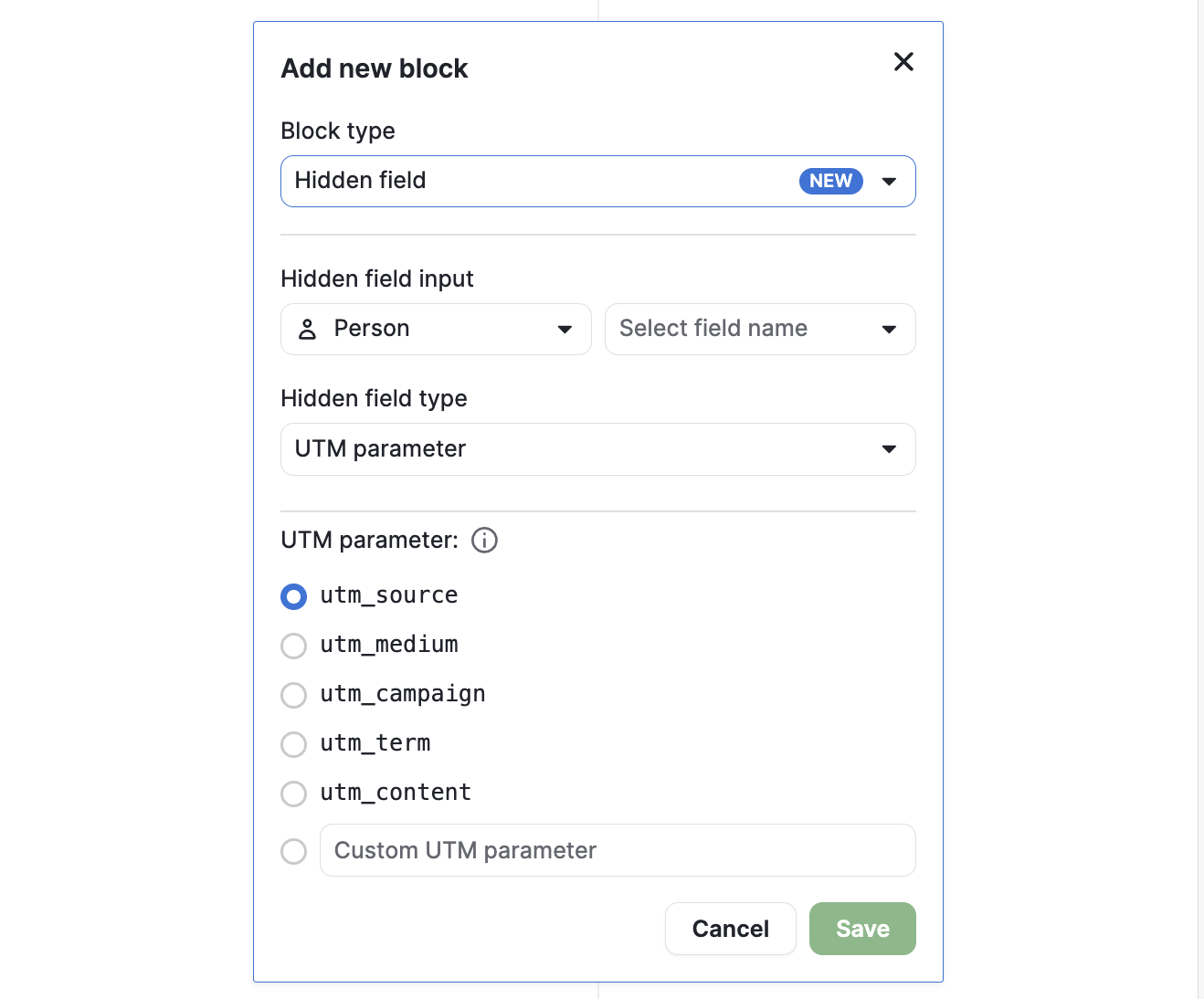
Our score: 5/5, no notes. It’s the same shape as last quarter’s range-selector fix: a real gap, closed cleanly, nothing for MetaPipe to add. Deal queries should always span open, won and lost, and now the UI finally agrees with us. The hidden fields in web forms make tracking so much easier. Forms are finally powerful out of the box.
Where to find it: closed-deals toggle is a switch at the top of any pipeline or list view. Stage names are on by default on the deal card. AI scoring visibility is Settings > Deals. Web Forms tracking fields are under each form’s field settings. Email retry appears inline on a failed send; auto-populated participants appear when you open the composer from a deal.
The MetaPipe angle: UTM parameters and hidden fields in forms make marketing efforts measurable. Pulling data from Adwords, Facebook and Linkedin and matching against leads in pipedrive finally became a one-liner in Claude instead of complex reports generated by the team.
Pipedrive shipped its own MCP server, and that matters here
Pipedrive has a public MCP server now. Like all apps start to do. Connect ChatGPT, Claude or another MCP-compatible assistant directly to your account and it can find, create or update deals, activities and contacts in natural language, no custom API integration required.
It is still true of the AI features bundled inside the app (Sales Assistant, email drafting, suggested replies): those remain closed, plan-gated, and not something another tool can drive. But the MCP server is Pipedrive itself admitting the same thing we’ve been saying: the real value is a callable interface, not a nicer screen.
Where it breaks: to be fair to Pipedrive, this isn’t reckless. It respects existing user permissions and every action lands in Pipedrive’s own change log, so there is an audit trail.
What it doesn’t have is a method. No equivalent of our house rules: no “always query open, won and lost together”, no fetch-merge on labels instead of overwrite, no blocked unlinked-activity creates, no deletion recipes instead of raw deletes, and the change log records that a change happened, not the reasoning an agent had for making it.
Point a general-purpose AI at raw access with no domain guardrails and it will happily do the same damage a careless human with API access could do, just faster.
The MetaPipe angle: we don’t compete with Pipedrive’s MCP server on access or on having an audit trail, both exist now. We compete on judgment. MetaPipe is built on the same kind of connection, with the operating rules layered on top: the ones that stop a bulk update from wiping labels, stop a lost pipeline stage from deleting its deals, and log every write with the caller’s stated reason, not just a change-log line. Need to import 20.000 contacts and companies? Metapipe will make sure the import file is well formatted. Need to run a massive bulk update? Metapipe will make sure you don’t burn through your daily API token limit in an hour.
Pipedrive MCP is currently blind to some areas of Pipedrive, like projects and filters. MetaPipe closes that gap.
Pipedrive built the door. MetaPipe is what you actually want walking through it unattended.
Oh, and we have a powerful deduplication tool built in as a bonus. Simply because we feel the pain of our clients struggling with the built-in dedup tool in Pipedrive.
The quarter in one table
| Update | Pipedrive UI today | The gap | MetaPipe does it as |
|---|---|---|---|
| Auto-log emails as activities | Pipedrive-sent only; external mail needs manual bulk catch-up | Growth+, not automatic for Gmail/Outlook | pd_activity, any source, any plan |
| Pulse / Reply? / Suggested Replies | Rules-based feed + Premium/Ultimate beta drafts | Plan-gated, weeks of warm-up, single-thread context | pd_mail + pd_summarize, full deal history, on demand |
| Send later | Single scheduled email, no edit, no recurring | No sequencing or conditions | Native is fine; Make + MetaPipe for sequences |
| Copy labels lead-to-deal | Admin opt-in, not retroactive | Past conversions stay unlabeled | pd_labels, bulk, retroactive |
| Bulk change revert | 30-day undo, native bulk edits only | Integration writes not covered | metapipe_audit_log, every write, by default |
| Projects task triggers / Gantt | Rule-based triggers, add-on pricing | If/then only, extra cost | pd_project + reasoning, any client |
| Automation health dashboard | Monitoring, auto-deactivate on repeat failure | Reactive, no reasoning about the rule itself | metapipe_audit_log, every write, with a stated reason |
| Closed deals in pipeline/list view | Persistent toggle, open+won+lost visible | None, it’s a good fix | MetaPipe queries all three by default already |
| Pipedrive’s own MCP server | Raw find/create/update via any MCP client, logged to Pipedrive’s change log | No house rules, no domain guardrails, log has no stated reason | MetaPipe: same access, governed, with a reason on every write |
| Pipedrive AI (email, reports) | Premium/Ultimate betas + shallow all-plan tools | Not callable by other tools | Open, audited agent layer |
Verdict
Every one of this year’s Pipedrive updates makes the UI faster to click through, and one of them, the MCP server, makes Pipedrive itself faster for software to drive. If your team lives in the app all day, update by update, 2026 has been a good year. If you’re building toward agents doing the routine work, the interesting layer still isn’t in these release notes: it’s the API underneath, now with an official front door, and MetaPipe is how we give it judgment, guardrails and an audit trail.