 Metabrain
 MetaPipe
 MetaHub
 Pipedrive
 HubSpot
 Make & Integrations
 Company Brains (MCP)

Turn the call into a quote while the conversation is still fresh. Keep products and prices in your CRM, let your AI connector draft the quote from your example layout and call transcript, and keep a dated follow-up on every sent quote. Add the Make.com payment workflow only if you collect payments online.
1. Record discovery calls so scope is never lost
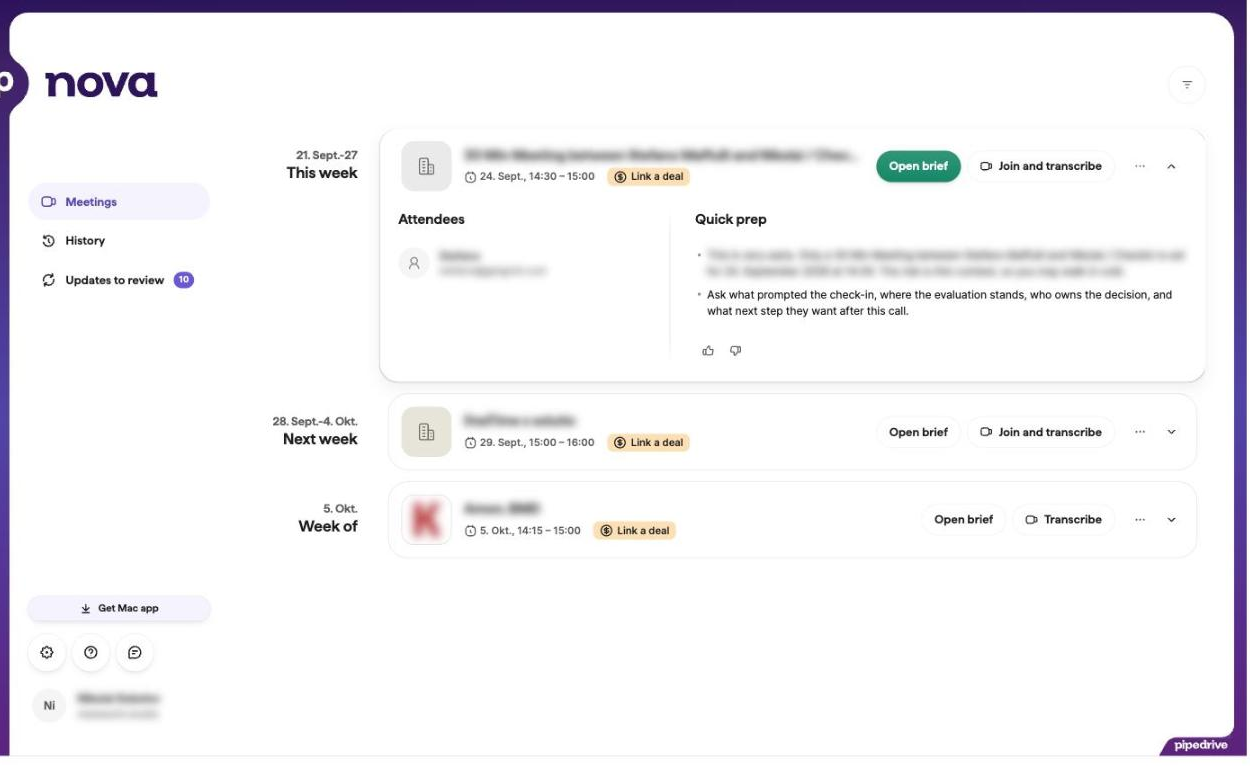
Enable the meeting recorder included in your Pipedrive plan, or connect Fathom, Fireflies, Teams, or Meet. Configure the integration so transcripts and summaries attach to the right Pipedrive deal automatically.
In-depth article
Enable call and meeting recording in your HubSpot plan, or connect Fathom, Fireflies, Teams, or Meet. Configure the integration so transcripts and summaries are logged on the right HubSpot deal automatically.
2. Build your CRM product catalog with one prompt
Before generating quotes, your products and prices need to live in Pipedrive. Upload your price sheet or share your website URL in Claude or ChatGPT. MetaPipe creates the catalog in one go instead of making you type every product by hand.
What you type in Claude / ChatGPT
Read our pricing sheet, or our services page at https://..., and set up our product catalog in Pipedrive via MetaPipe.
1. Create each product or service package with its name, product code, unit price, currency, and billing frequency: one-time or recurring.
2. Group tiers and add-ons clearly and show me the table before saving.
What happens in your CRM
A clean Pipedrive product catalog with prices, currencies, and billing frequencies, ready to attach to any deal.

In-depth article
Before generating quotes, your products and prices need to live in the HubSpot product library. Upload your price sheet or share your website URL in Claude or ChatGPT. MetaHub creates the library in one go instead of making you type every product by hand.
What you type in Claude / ChatGPT
Read our pricing sheet, or our services page at https://..., and set up our product library in HubSpot via MetaHub.
1. Create each product or service package with its name, SKU, unit price, currency, and billing frequency: one-time or recurring.
2. Group tiers and add-ons clearly and show me the table before saving.
What happens in your CRM
A clean HubSpot product library with prices, currencies, and billing frequencies, ready to add as line items to any deal.
3. Draft same-day quotes straight from the deal
Combine the call notes from step 1 and product catalog from step 2 to draft a quote straight from the deal on the same day.
Good quotes take a bit of setup the first time: your AI needs to see an example of how you structure proposals (cover details, outcome-focused scope, work packages or product table, timeline, and totals) and learn how your CRM fields map into it. Once you walk through the first quote together, save the workflow as a playbook in MetaPipeMetaHub (or as a reusable skill in Claude / ChatGPT) so every future quote builds itself from the deal and call transcript.
What you type in Claude / ChatGPT
1. Ask me to upload an example of one of our past quotes or proposals first. Inspect its structure, tone, typography, sections, and pricing table.
2. Using MetaPipe, read the Pipedrive deal, organization, contact person, product catalog, and the latest call transcript. Propose how our Pipedrive fields and products map into the quote, ask me wherever a field mapping is vague, and confirm which deliverables and options from the call transcript to include.
3. Attach the agreed product line items (quantities, prices, discounts, tax, and billing frequency) to the Pipedrive deal, draft the complete quote matching our example’s structure (single-column, concise client outcomes, clear work packages, and verified totals), and once I approve it, save this quoting workflow as a reusable playbook in MetaPipe (or as a Claude / ChatGPT skill).
What happens in your CRM
Deal line items are synced to the Pipedrive deal, a complete proposal is drafted in your layout from the call transcript, and your quoting rules are saved as a reusable playbook for the next deal.

In-depth articles
What you type in Claude / ChatGPT
1. Ask me to upload an example of one of our past quotes or proposals first. Inspect its structure, tone, typography, sections, and pricing table.
2. Using MetaHub, read the HubSpot deal, company, contact, product library, and the latest call transcript. Propose how our HubSpot properties and products map into the quote, ask me wherever a mapping is vague, and confirm which deliverables and options from the call transcript to include.
3. Add the agreed line items (quantities, prices, discounts, tax, and billing frequency) to the HubSpot deal, draft the complete quote matching our example’s structure (single-column, concise client outcomes, clear work packages, and verified totals), and once I approve it, save this quoting workflow as a reusable playbook in MetaHub (or as a Claude / ChatGPT skill).
What happens in your CRM
Line items are attached to the HubSpot deal, a complete proposal is drafted in your layout from the call transcript, and your quoting rules are saved as a reusable playbook for the next deal.
For multi-page branded PDF proposals with custom cover pages, comparison blocks, and phase timelines, our Company Brain (metabrain) stores your corporate design and renders print-ready PDFs directly from the deal context.
4. Optional: add a Stripe payment link with Make.com
This step is optional for teams collecting card or SEPA payments or deposits online. If you invoice through your ERP or accounting after sign-off, skip straight to step 5.
Open Maia in Make.com and paste this prompt. Connect your accounts and check the generated scenario before activation. If the payment link must be in the initial quote, use quote approval as the trigger. A Won trigger creates it later.
What you type in Maia
Build a Make.com scenario that starts when a Pipedrive deal moves to Won or its quote is approved. Use the approval field I confirm.Build a Make.com scenario that starts when a HubSpot deal moves to Closed Won or its quote is approved. Use the deal stage or quote status I confirm.
1. Fetch all deal line items. Transfer each product, quantity, price, discount, tax, and currency to Stripe.
2. Verify that the Stripe total matches the full deal amount. Stop and report any mismatch.
3. Create a Stripe invoice with a hosted payment link. Write the link and invoice number back to the deal so they can be included in the approved quote. Do not create a second invoice when the same deal triggers again.
What happens in your CRM
The approved line items reach Stripe, the total is checked, and the payment link returns to the deal.

5. Enforce zero-orphan follow-ups on every sent quote
Book the 15-minute proposal review call on both calendars when sending. Never leave a deal in Proposal Out without a dated next activity. Stop automated messages on reply, booked meeting, or a closed deal.
Create a deal workflow triggered by entry into Proposal Out. Check the next activity and create a dated follow-up assigned to the owner when one is missing. Check existing activities to avoid duplicates.
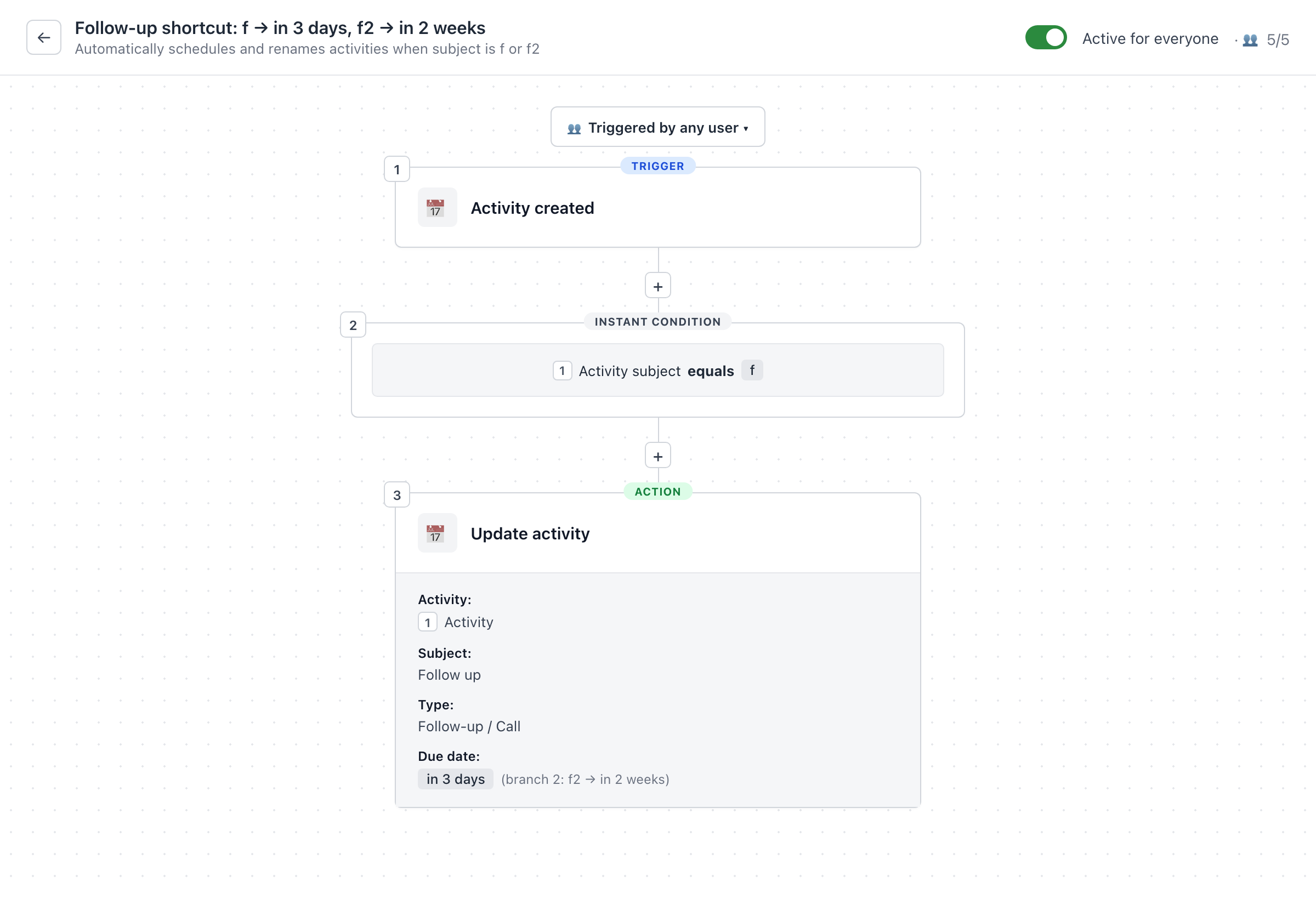
Pipedrive has a shortcut for this: type f or f2 as an activity subject. It takes two automations. Open Automations and build one rule triggered by Activity created, then a second triggered by Activity updated. The second handles activities you rename later.
In both automations, add an If / Else condition on Activity Subject. Branch 1: Subject equals f → set Subject to Follow up, Type to Call or Follow-up, and Due Date to in 3 days.
Branch 2: Subject equals f2 → set Subject to Follow up, Type to Call or Follow-up, and Due Date to in 7 days. Leave other subjects unchanged. Renaming to Follow up prevents the update rule from repeating the shortcut.
In-depth article
Use a deal workflow on entry into Proposal Out to create a dated follow-up task for the deal owner. This requires a plan with deal workflows. With an eligible Sales seat, use a Sales Sequence that automatically unenrolls on reply or a meeting booked through its meeting link. Also stop it when the deal closes.
6. Put same-day quoting into practice
Ready to run this in your CRM today?
Connect Pipedrive to Claude or ChatGPT through MetaPipe and run every prompt in this playbook on your live pipeline. Try MetaPipe free for 30 days.
Connect HubSpot to Claude or ChatGPT through MetaHub and run every prompt in this playbook on your live portal. Try MetaHub free for 30 days.