 Metabrain
 MetaPipe
 MetaHub
 Pipedrive
 HubSpot
 Make & Integrations
 Company Brains (MCP)


The rise of AI agents did not make software applications obsolete. It made them load-bearing.
An agent is a strong reasoner with no hands: to read and update live business state safely, it needs a structured, permissioned surface that enforces schemas, edge cases, and auditability. That surface is the application, exposed as a callable tool over the Model Context Protocol (MCP) or an API.
The core rule: The agent supplies the intent; the app supplies the reliable, audited action. Take away the app and the agent is a chatbot that can only talk about your business, not run it.
In our earlier breakdown on why building your own CRM with AI fails, we looked at teams trying to replace SaaS tools with vibe-coded internal apps. The flip side of that mistake is assuming an agent with a raw prompt and a database connection can replace the app’s domain logic at runtime. Neither works once real customers, multiple reps, and compliance audits enter the room.
What part of the app loses value — and what gains value
Asking “will agents replace apps?” frames the wrong binary. The better question is “which layer of the application survives when humans click fewer screens?”
For fifteen years, B2B software competed heavily on UI chrome: filter bars, drag-and-drop kanban boards, modal forms, and settings menus. Agents do not care how smooth your drag animation is. When a revenue team asks an agent to brief an account, log call notes, qualify an inbound lead, or stage a batch import, the UI chrome steps into the background.
Everything underneath the UI becomes more valuable, not less:
- The domain schema and invariants: Valid object relationships, required stage fields, currency rules, and tax calculations.
- Accumulated edge-case handling: Duplicate resolution, GDPR suppression and retention windows, dunning state machines, API rate-limit budgets, and idempotency keys.
- Role-based permissions: Scoping what a junior SDR’s agent can read or mutate versus a RevOps admin.
- Confirmed write-back and audit logs: Recording not only what changed, but which user and which agent connector executed the write.
Re-deriving those rules inside a system prompt on every turn guarantees silent drift. Encoding them once inside the app — and exposing them through governed tools — gives the agent rails it cannot hallucinate past.
Proof in miniature: auto-generating deals when importing data into Pipedrive
You do not need an exotic enterprise scenario to see why raw prompts and naive triggers break. Take one of the most common operational requests we see in Pipedrive setups: auto-generating deals when importing a spreadsheet of contacts and companies.
1. Why a plain CSV upload leaves the pipeline empty
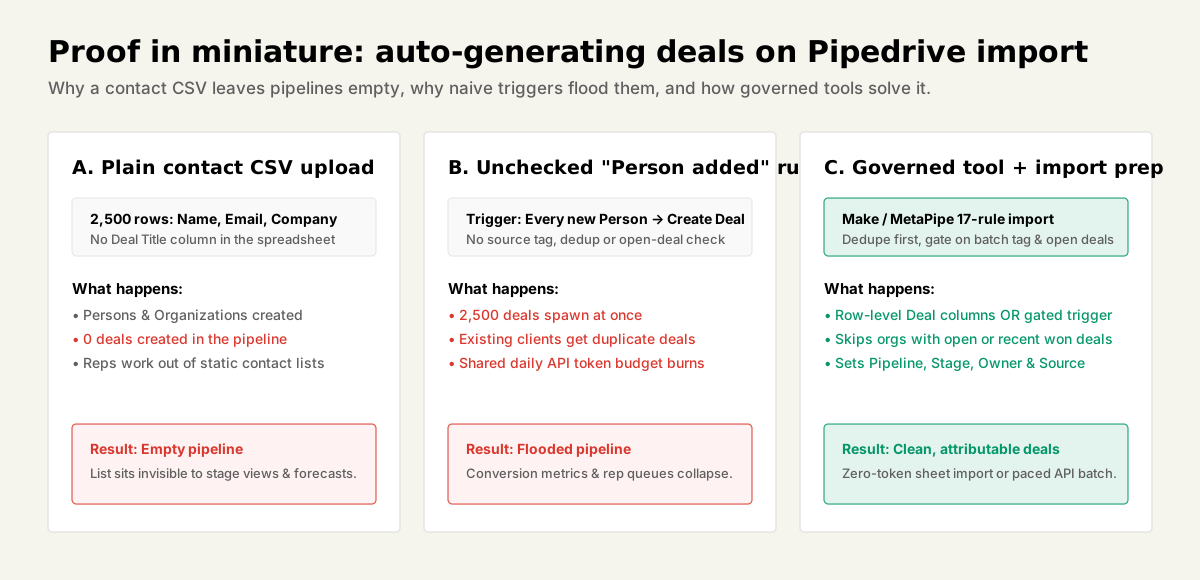
When a marketing or outbound team uploads a CSV of 2,500 trade-show leads or enriched target accounts (Name, Email, Company, Phone) into Pipedrive, Pipedrive creates Persons and Organizations — and zero Deals.
Unless every row in the spreadsheet explicitly includes Deal columns (at minimum Deal — Title, plus pipeline and stage mapping), Pipedrive’s importer stops at the contact book. Sales reps open their pipeline board after the “migration” and see nothing to work. (We cover how Pipedrive separates spreadsheet imports, Import2, and API writes in our complete Pipedrive data import guide.)
2. Why an unchecked automation or raw agent script floods the CRM
The instinctive fix is either switching on a native workflow automation (“Every time a Person is created → Create a Deal”) or telling an AI agent with raw API access to “import this CSV and open a deal for every row.” Both fail immediately in production:
- Existing clients get junk deals: Any contact added to an existing customer account — a billing contact, an implementation engineer, a new stakeholder synced from email — triggers a fresh New Business deal.
- Multi-contact accounts spawn duplicates: If a target company has four buyers in the CSV, four competing deals land in Stage 1 for the same opportunity.
- Missing routing metadata: Deals arrive without a deterministic
Pipeline,Stage,Owner,Value, orSource channel, poisoning conversion reporting. - Shared token-budget exhaustion: On Pipedrive’s API budget (
30,000 base daily tokens × plan multiplier × seats), firing four unbatched search-and-create calls per row across thousands of rows burns the org-wide daily quota and stalls live integrations.
3. How governed tools solve it cleanly
When you treat the CRM and its orchestration layer as structured tools rather than raw endpoints, there are two clean patterns depending on where the data starts:
- Pre-validated spreadsheet import (zero API tokens): For a clean one-time batch, an agent or prep script deduplicates the CSV against existing Pipedrive Organization domains and emails offline, groups multiple contacts under one primary buyer per opportunity, stamps explicit
Deal — Title,Deal — Pipeline,Deal — Stage,Deal — Owner, andDeal — Source channelcolumns onto the primary rows, and hands the file to Pipedrive’s native importer — which carries a 48-hour admin rollback window and consumes zero API tokens. - Gated Make scenario or governed MCP workflow (for recurring drops): When imports arrive continuously from event forms, enrichment pipelines, or outbound responders, a Make scenario or governed MCP tool enforces four guardrails before creating any deal:
- Batch scope condition: Only fire when the imported record carries an explicit batch label or
Source channel(never on everyPerson createdevent). - Entity deduplication first: Match Organization by normalized domain + name and Person by email/phone before writing.
- Open/recent deal check: Query the Organization first; if an open deal already exists in the target pipeline — or a deal closed within your cooldown window — attach the Person as a participant or log a note instead of opening a duplicate deal.
- Deterministic assignment & audit: Populate
pipeline_id,stage_id,user_id, currency, acquisition channel, and an audit note recording the import batch ID.
- Batch scope condition: Only fire when the imported record carries an explicit batch label or
Notice what did the heavy lifting here. The LLM can help normalize messy job titles, infer industry segments, or draft the first outreach note. The app and its governed tool layer enforce uniqueness, stage invariants, token pacing, and rollback safety.
MCP turned “apps as tools” into an industry standard
Until recently, wiring an agent to business software meant maintaining brittle glue code per model vendor. Between late 2024 and mid-2026, the Model Context Protocol (MCP) turned callable app surfaces into vendor-neutral infrastructure:
- November 2024: Anthropic open-sourced MCP with roughly 100,000 initial SDK downloads and around 50 reference servers.
- March 2025: OpenAI adopted MCP across its agent SDK and desktop tooling, followed within months by Google, Microsoft, and Salesforce.
- 9 December 2025: Anthropic donated MCP to the newly formed Agentic AI Foundation under the Linux Foundation, co-founded with OpenAI and Block and backed by AWS, Google, Microsoft, Cloudflare, and Bloomberg as platinum members.
- 25 March 2026: Official MCP SDK installs crossed 97 million (~16 months from launch), with public registries tracking roughly 8,000 to 12,000+ MCP servers by Q2 2026.
- 28 July 2026: The MCP specification revision moved to a stateless transport architecture, dropping mandatory stateful session handshakes so enterprise servers can scale horizontally behind standard API gateways and audit proxies.
What this looks like across the CRM stack in late 2026
The shift from read-only “chat with your data” demos to audited write-back is already visible across revenue tools:
- HubSpot: Shipped the first major CRM Connector for Claude with write capabilities (creating and updating records, logging notes, assigning tasks) on 20 November 2025, followed by general availability of its MCP server in April 2026. Crucially, every mutation is attributed in the HubSpot Audit Log to both the authenticated user and the Claude connector.
- Make: Released its official MCP server alongside native Make AI Agents in 2026. Instead of giving an LLM raw credentials to ten downstream apps, you expose vetted Make scenarios as callable tools — letting Make enforce authentication, input schemas, retries, and full execution history.
- Pipedrive (and why raw wrappers aren’t enough): Pipedrive launched its official remote MCP server (
mcp.pipedrive.ai) in June 2026 and entered Claude’s connector directory in August 2026. As we showed in our November 2026 live audit of Pipedrive’s MCP server vs MetaPipe, exposing 79 thin REST wrappers gets an agent connected, but still leaves bulk import validation, cross-object deduplication, destructive-write confirmation gates, and daily token-budget pacing unsolved. A governed MCP layer closes that gap by bundling domain playbooks and hard guardrails directly into the tool contract.
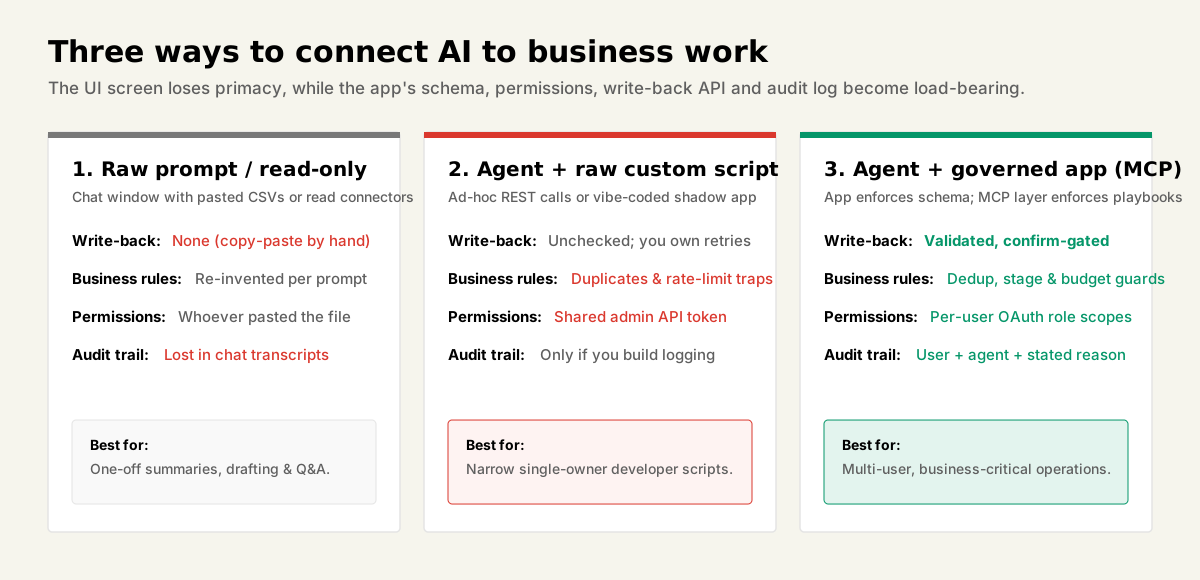
Raw prompt vs custom script vs governed app over MCP
| Dimension | Raw prompt / chatbot | Agent + raw custom script | Agent + app as tool (MCP / API) |
|---|---|---|---|
| Business data access | None unless pasted manually | Custom queries you wire by hand | Structured, live, schema-typed |
| Write-back | None (human copy-pastes) | Unchecked unless you build guards | Native, validated, confirm-gated |
| Edge cases & domain rules | Re-invented per prompt | Re-implemented in your script | Encoded in the app + tool playbooks |
| Permissions | Whoever holds the chat window | Often a single shared admin API key | App enforces per-user OAuth scopes |
| Audit trail | Buried in chat transcripts | Only if you build custom logging | App logs user, connector, and timestamp |
| API drift maintenance | N/A | Your engineering team | Vendor / managed MCP layer |
| Best fit | One-off drafting & Q&A | Narrow, single-owner developer task | Multi-user, business-critical operations |
When an agent plus a raw script does win
To be fair: you do not need a SaaS subscription for every 60-line job. When a task is narrow, short-lived, single-owner, and non-custodial — transforming a local export, scraping public pricing pages into a research brief, or running a one-time diagnostic query — letting a coding agent write a local Python script beats buying and configuring another app.
The custom script loses the moment three conditions show up together: multiple non-technical teammates rely on the state, mutations affect customers or revenue numbers, and someone will eventually ask “who changed this record last Tuesday and why?” That intersection describes almost all core CRM, billing, forms, and operations software.
Buyer checklist: how to evaluate “AI-ready” apps in 2026
Ignore “AI-powered” sparkle icons inside the vendor’s own sidebar. If you want your agents to actually operate an application over the next three years, test five concrete surfaces before signing an annual contract:
- Confirmed write-back over API or MCP (not read-only): Can an external agent create records, update stages, attach notes, and trigger workflows — or can it only search and summarize? Read-only integrations build nice morning briefings; they cannot clear an inbox or stage a pipeline.
- Per-user scoped authentication: Does the MCP server or API support OAuth scopes tied to individual user seats and field-level permissions, rather than forcing every automation through one god-mode admin token?
- Actor attribution in the audit log: When an agent updates a deal value or archives a contact, does the app’s native audit log distinguish
User X via Connector Yfrom a manual browser click? - Idempotency, bulk limits, and clear error contracts: Does the API return structured validation errors (missing required stage field, duplicate key, remaining rate-limit budget) that an agent can read and recover from safely without double-writing?
- No enterprise tax on basic API/MCP access: Check whether webhook, API, or MCP access is locked behind the vendor’s highest enterprise tier. An affordable seat price with a paywalled API is an expensive manual data silo.
When a system you rely on exposes an API but lacks safe agent guardrails, the fastest path is putting a governed MCP layer in front of it rather than ripping out the database. That is why we built MetaPipe for Pipedrive and MetaHub for HubSpot inside the Metawork Harness: giving Claude, ChatGPT, and internal agents confirmed write-back, 17-rule import preparation, confirmation gates before destructive changes, API token-budget pacing, and a complete audit log with a stated reason on every write.
Verdict: Agents did not kill apps; they promoted them from screens you click to tools your agents call. The durable value of an app in 2026 is the write-back API or MCP server, the business rules it encodes, and the audit log that says who did what. Pick apps that expose real, permissioned write access. An agent wired to read-only integrations can talk about your business; only an agent wired to apps that write can run it.